It's precursor (the DPTS1, which is also mentioned in the article) is just as weird. Specifically, it's a product that I obsessed over some time, but is actually incredible niche and not widely available. The resellers specifically target lawyers and other specific professions.
It's also nearly impossible to find a physical place where you could test it without making an appointment. There are few things I want more than a product like this to succeed. I have had a couple of Microsoft Surface products, and they are amazing. Game changing even. But nothing beats e-ink as far as being pleasant on the eyes for extended periods of times.
I've been trying to move from books to e-books, just because I don't have a lot of space to keep books anymore. For non-technical books, a Kindle suffices. But for anything even slightly technical everything falls short. Nothing comes close to the experience of physical books. The surface is the closest for me, but even that the software available for making annotations on it is lackluster, and just staring at a screen too long is not pleasant. This sort of large e-ink tablets I hope are the solution, but their popularity being so lackluster, makes me think that those that have spent the money aren't quite happy with it.
I wish more products like this keep coming out until one sticks.
I share this sentiment. Way back when Plastic Logic killed themselves by trying to bite off too much of the ecosystem, their legal pad sized 'Plastic reader' was something I could see replacing both printouts and faxes.
I came at this way back in the epaper epoch by getting an Illiad2 from IRex Technologies (a large epaper device with a watcom digitizer), I've since gone through an iPad, iPad Pro, and currently use a Surface Pro 4 for this function.
The essential bits are exactly smooth drawing on it and for wide market penetration low cost. I have been really impressed with Microsoft's ASIC which makes drawing on Surface almost lag free.
Sony on the other hand has a history of weak business models, I was amused by their selling of the books made available by the Gutenberg project for their original e-book (as an example).
The product I would find really interesting (and would buy at least one of :-) Would be an e-paper tablet that I could draw on at a reasonable PPI (200+) that was US standard paper drawing area, built in wireless network and presented to my computer as a 'printer' on the network. I would use it by printing to it from my phone or my laptop and I would use it to review things and write notes on them (sort of like Drawboard PDF) and then either push the annotated prints into an archive or delete them once I was done with them.
Something that might fulfill your interests would be the BoogieBoard Sync[0]. It can bluetooth connect to your phone (iOS and Android), where it will upload what you write in a PDF format. The device can be connected to a PC via USB, and the data can also be pulled off in PDF format. You cannot pull up what you write on the device itself though.
I don't think it's quite US Standard Paper (I don't have mine with me at the moment to check), but it is quite a decent size.
It takes only a moment to save what you've written, and clearing the screen takes a split second. You do have to use a special stylus it comes with to write to the device though, other strokes won't be saved. The battery life is supposed to be ~7 days of run time, if you were writing continuously. It is quite slim, and very light weight.
From what I've read, the PDFs store your pen strokes. They claim this is optimal for OCR, but I've never tested that claim.
I think I have 5 or 6 BoogieBoards around my lab, one of them is a 'sync'. The challenge with the boogieboard is that they are like writing with a very fat marker. (and its a bit smaller than standard paper.
If you compare what you can do with that vs a Surface Pro 4 pencil and Drawboard PDF the contrast is fairly startling (and expected given order of magnitude difference in price).
I asked the inventor of the Boogieboard at Makerfaire if they had ever considered making a large whiteboard sized one (that would be pretty useful in my lab). He said they would consider it but there were technical issues with the surface area vs the erase mechanism (something like generating a very strong electric field across a very large area like that).
I would use it by printing to it from my phone or my laptop and I would use it to review things and write notes on them
Uh...interesting! I'd honestly be quite happy with just PDF functionality, but this would also be an interesting workflow. I could totally see myself finding either documentation, tutorials, or other things to print to then be able to write notes on top of.
Very interesting. This is a workflow I could get behind of.
A number of my colleagues print to paper for code review. They find it easier to read and markup in that format.
I personally can't stand the idea of using that much paper, but I dig the future-y idea of printing to a read/markup slate, and automatically posting the markup to phabricator.
I imagine legal and other business functions that are review heavy could similarly benefit.
>A number of my colleagues print to paper for code review. They find it easier to read and markup in that format. I personally can't stand the idea of using that much paper
That's why I like to print code in an ultra-small font with 4 pages per sheet, duplex.
I use the "Print to OneNote" feature for this a surprising amount. I can "Print to OneNote" on my Desktop, wait for it to sync to my Surface and draw/markup there, for example.
Right now I do something similar (but more cumbersome) with my iPad Pro: I print to PDF, save the PDF in iCloud Drive, and then open it in Preview on the iPad, which lets me annotate it with the Pencil.
What I really wish I could find is some way to do the same for e-books. Amazon, if you're listening, it'd be a game changer if you could support this in the Kindle app.
I bought DPT-S1 on sale from B&H last summer for $600 after ignoring Sony for many years(rootkits et al).
DPT-S1 even with its limitations (PDF only, so Calibre is extra helpful) it feels amazing to read on it.
It is a combination of hardware (lighter than 9 inch iPad, amazing screen, battery lasts a month) and quite decent software tailored for PDF reading and note taking.
I read on multiple devices, iPad Air, Kobo H20, Kindle DX and others.
Out of all devices DPT-S1 is by far my favorite for consuming text and gray scale images.
I thought of ordering a dev kit for the 13.3 inch screen but Sony really did do a good job on this that no single developer could hope to come close.
BOM for DPTS1 is probably around $200, so I envision a future where digital paper could reach mass adoption and cost less than $100.
For some reason no company feels compelled to push for this mass adoption.
Back to reality and to some of the geek things of the early 2000's: IBM had some kind of foldable screens in the demo department. I remember some video or concepts and you could see a guy reading his newspaper on his folded screen. Attach 8 of them together in a binder and you got some kind of physical computer interface that you can easily skim, read and pass around.
I had the same thought when e-ink tablets started coming out. It seems like the obvious solution for people who don't buy e-ink tablets because they "aren't books".
But ... what exactly does it solve? Fundamentally all it provides is a way to mechanically flip through the pages of a digital book. It doesn't replicate a real paper book, in terms of feel, smell, or nostalgia.
Ignoring nostalgia, is the ability to mechanically flip through a book important? Is that the ideal way to traverse a large volume of text? I doubt it. It's unlikely that, when humanity designed paper books they stumbled on the ideal way to handle a large volume of text.
When I'm reading things on my computer, whether they're articles or books, I never really think "man I wish I could flip through this text like a book." PgDn handles that just fine.
What I usually long for is a more portable form factor, which tablets solve, and more space. Side-by-side pages is great, not just for reading, but also for looking at different sections of the book at the same time. Again, a tablet _could_ solve that. If they made e-ink tablets larger ...
Heavy readers and researchers I'm sure will argue about bookmarking and notes. That's not unique to physical volumes; tablets can handle that. And again, probably better. Maybe we don't have the right UIs for them yet. But I guarantee we eventually will.
Basically, I don't think having a bunch of e-ink pages is what we need. We just need the readers to be bigger, faster response time, color, physically flexible, and have better UIs.
Of course, none of that addresses the nostalgia factor. But I don't think people are going to have such a strong desire for old fashioned books once we have e-ink readers that are fundamentally easier to use than physical books.
In 20 years perhaps the new generation will want physical slabs to hold when they read a book.
Nostalgia is always a shrinking market. Imagine someone who really wanted to access Google using the Dewey Decimal System. At least the amount of content in books remains about the same as it always has.
I think you are missing the point I am trying to make. It's not about the nostalgia effect but about the physical particularities of a real book: building a mental map that has anchors in the book. Think of the memory palace technique.
Same here. Tablet screens hurt my brain, and I would love a product like this for annotating papers / articles / textbooks. There's reMarkable coming out later this year, targeted for a more general audience (https://getremarkable.com/) -- hopefully it lives up to the promise, or at least gets more people excited about such a product.
But I'm honestly kind of amazed that something like this isn't already widely available at a reasonable price... I don't feel like my needs are that atypical and it's just the dream product to me.
I have been keeping tabs on reMarkable, it almost addresses all of my needs. I wish it could run OneNote as that is my go-to note taking software. My biggest concern with niche e-ink products is that the parent company will not be around long enough to maintain its software services. I am highly tempted to preorder reMarkable solely on the premise of supporting the startup.
The Boox units mentioned elsewhere in this thread may be better since they run Android, but I'd look at the linked Mobileread discussion and possibly wait until the next revision later this year.
Ah, I'm sorry, you are correct. In the month-old discussion at https://news.ycombinator.com/item?id=13865108 someone listed off the devices in this category (https://news.ycombinator.com/item?id=13865777), including two Onyx Boox units (13.3 & 9.7 inches). The Onyx Boox Max Carta should be available after the Hong Kong Electronics Fair - sounds like the same device but with a higher resolution screen.
The Mobileread discussion linked from there is >60 pages of discussion including staff from the company, and there's discussion of a Boox Max 2 coming out later this year that will have the higher-resolution screen, touch instead of pen, an updated (but still slow) processor, possibly a bump in Android version (still ancient, jumping from 4.0.4 to 4.4 perhaps?). Doing a little digging, the processor change may not be a processing power increase but a power consumption decrease (i.MX6 to i.MX7). Note that all of this is unofficial and that it doesn't seem like the details have been finalized.
I'll also note that (without reading the whole 60+ pages) I saw at least one person who'd also installed apps from the Google Play store and found that troublesome, particularly when updating the firmware in the device.
Edit: after a bit more reading on Mobileread there might also be a 10.3" version of the Boox ("Boox Note") towards the end of the year; they're taking prototypes to the Hong Kong fair to gauge interest but would likely not do mass production until October (https://www.mobileread.com/forums/showthread.php?t=285006)
Yeah, I hope it won't rely solely on its own cloud service for backup for those reasons. I like my hardware products to remain functional even if the company goes under.
I just looked around online and it's still impossible to find a DPT-S1 in Canada. There's no mention of when the US version of the DPT-RP1 will be available.
Which is a shame because I'd love to purchase this for reading technical books.
The Kindle DX was nice for this. They stopped selling it, though. I loaned mine to a nephew and he managed to get it stolen inside of 30'. Now I use an iPad Pro, but it's clearly not equivalent. I really miss the DX!
> It's also nearly impossible to find a physical place where you could test it without making an appointment.
b&h photo had one in their store to play with. Was very nice, weighed much less than I expected, but still wasn't quick. They seemed to push the note taking with a stylus feature which I didn't really care about.
The 13 inch size is amazing, but leaves the whole thing probably larger than I really wanted.
If Apple introduced this, it would be called "disruptive" and "revolutionary". From Sony, it's "weird".
eInk still costs far too much per unit area. You can buy wall sign sized eInk displays, but they'll cost much more than an LCD TV panel of the same size. 32" diagonal display, $3,599.[1] Compare 32 inch color LCD TVs for $200 at WalMart. Despite talk of cheap "electronic paper" displays, the eInk people never delivered on cost.
I think your reaction is a little knee-jerk. "Weird Sony" has been an in-joke for some time, here's Penny Arcade making fun of it in 2004: https://www.penny-arcade.com/comic/2004/12/13/the-sony-syndr... (when they didn't even like Apple yet). Sony has a noted history of these strange, slightly off-beat products that always sound more useful on paper than they turn out to be in practice.
Any idea what those ballpark figures look like today?
The E ink product you linked is a dev kit targeting a niche market, not a general CE product manufactured in the millions and benefiting from economies of scale...I'm simply not seeing the relevance of the comparison.
eInk doesn't publicly release prices. It's a "contact sales" kind of business.
Visionect's 9.7" e-ink sign, which is their version of a digital picture frame, costs $400.[1] That's a product, not a development kit. A comparable LCD digital picture frame from WalMart costs $70. Color, too.
Hi there, Ursa from Visionect here. Just a slight clarification: the 9.7 Sign is not a consumer product in the sense of a digital picture frame. Rather it is a sort-of development kit, a blank canvas device on which companies can develop their own products. So geared towards professional use. Plus, the battery lasts four months;)
Large scale e-ink always seemed like a good medium for digital signage because it works in bright light.
A friend's wife works at the United Nations, and a couple years ago I got invited to have a drink at their bar, I was really looking forward to seeing the e-ink wall display (made of tiles of smaller screens - not an entire surface) but unfortunately it was broken so I never got to see what it was like in person :( https://www.youtube.com/watch?v=pnb4tFK4I90
I read lots of research papers and books. I used to think that once I get big and high contrast e-paper tablet with ability to annotate I don't need paper anymore.
Then I noticed that e-paper is window to knowledge that allows me to look in but never allows my mind to enter. There is cognitive wall between myself and the things I read.
Reading physical papers and books and storing them is concrete memory palace technique. Writing notes on them, underlying, leaving coffee stains and folding corners, adding sticky notes etc. is concrete physical creation of of a memory palace. It helps to arrange, retain and absorb knowledge with spatial associations.
When I store paper I have just read into a stack of papers, or put it into a folder in a bookshelf, it's stored in a spatial space that helps with remembering and recollection just like memory palace memorization technique. If I look at the paper years later, just quick glance brings in the associations. E-paper tablet is just the same tablet every time.
I still use tablets and computer to read fiction and skim abstracts. If I have to fully learn and think what I read, I print it out.
I replaced books with my Kobo and iPad years ago, but replaced the iPad with a Surface since. I don't have any memory palace issues, but a bookshelf is a must.
To solve my bookshelf issue I use Calibre and keep all of books, including technical manuals in it. I store all of the files and the Calibre database on a folder in DropBox. It suits me fine. I standardized on PDF and ePub files for maximum compatibility, but Calibre will also convert the files on the fly for me.
I have a very similar problem. I bought a Kindle years ago because I thought it will solve all my reading problems - I wasn't even thinking about annotating stuff, so my use-case is weaker/easier than yours.
Now, I tend to do two kinds of reading - (1) research papers - often with multicolumnar writing, tables, diagrams and mathematical notation (2) "normal" books.
I realized that kindle is very bad for (1) ---- I could load a PDF but then I don't get to use flow, and given the screen size, this can be annoying. Converters (like calibre) don't always work. Math symbols (which can show up mangled), diagrams and tables can get displaced from the "region" of discussion. Eventually I just moved to read stuff of type (2) on my Kindle. For (1), I still use printouts.
Trying to replace paper with eInk isn't wise. However, those devices could have other, entirely new usages. For example, digital blackboard that consumes little power and can be remotely updated would be extremely useful. This isn't something that is possible with normal monitors because of power consumption and the annoying glow. That's just one possibility.
I always wondered how my parents were able to learn by writing with their pencil on their slate, wiping it off afterwards and writing the next thing on it. Seems comparable to me.
https://de.wikipedia.org/wiki/Schreibtafel#Schiefertafel
Yea--I noticed the same thing. I'm wondering if it would be different if I had a device I could write on, but not buying anymore readers, at least for awhile.
I can bring up parts of a book page in my mind, but I don't think I can do it with electronic readers. I'm not sure, because I haven't been in school for awhile, or needed to bring up something for a test.
When I was in school, I had a hard time memorizing. I started taking notes differently, my recall increased dramatically.
I would doodle on every page. Every page of notes was only written once, and I never re-copied. I tried to make every page a picture. My text books were filled with doodles, and pictures in the margins.
It really helped me.
Now--my books are just taking up too much room. I hate to get rid of them, but might have too. There was a time where I could get any book on the Internet. Those days are gone.
I'm not a big reader either. My books are just reference, but have value to me. I know it's crazy.
I've been excitedly watching this product category for a while. I wanted to buy a DPTS1, but it turns it it only reads PDFs, nothing else. That felt a little too limited for $900. I've pre-ordered the reMarkable tablet, though more as a vote for the product category than love for the specific product.
This doesn't replace paper at all, but it does bridge a gap that I've wanted to bridge for a long time. I've always liked printing out documents and making notes on them as I read, but it's hard to share those notes with others and it's impractical to haul the documents around. Products like this let me do this much more efficiently.
I've seen the reMarkable before, and it's definitely a product I'm interested in. However, every other e-ink writable tablet I've seen reviewed (other than the DPT-S1) has some amount of issues with input lag. I'm also cautious of buying products from companies I had never heard of before, which may or may not be justified. When you get your reMarkable, make a post here reviewing it. If it turns out to be any good, I'd like to know!
Sorry for the incoming barrage of questions, but I've been looking for a good e-ink device. I've come across this one before, but have read different experiences with it.
I've been pretty happy with it so far. The included stylus is pretty responsive.
> How smooth is the experience with PDFs?
Scrolling a PDF is a little weird on the e-ink screen - the refresh rate is kind of low, so it looks a bit like the old Windows Freecell victory animation while scrolling is happening. Switching between pages is smooth.
> Is it any good for annotating on top of PDFs?
Haven't tried it yet
> What file types does it support?
So far I've opened up PDFs, EPUBs and MOBIs. I believe there's more in it's app store, but I haven't needed to explore that yet.
> What is it's battery life like?
I charged it up when I got it at the beginning of March, and it's still at around 50%, with the Wifi enabled.
The only weird thing about this product is that it is so expensive. There has been numerous examples of products identical to this one, almost a decade ago I was drooling for one so bad.
I'm blaming apple. The iPad killed eink just as it was about to take off. Who would want a slow black-and-white display when you can have a fancy glossy color display?
Nevermind that you can't read properly on an glossy screen and that the battery life is measured in hours rather than days/weeks.
We lost out on so much potential for the gimmick that is the tablet.
You could make the counterargument that tablets floundered in obscurity for years until Apple released the iPad. The iPad made tablet ownership nearly ubiquitous among the types of people who might someday want to use a tablet for business purposes. The iPad isn't a business device, but it's breached the doors to the business market. It hasn't just tapped latent demand; it's created demand. In doing so, it's shown the way forward -- into a much bigger market than would have existed without it.
Eink devices are not (or rather, should not be) competing with the tablet that is the iPad.
The public didn't realize this because of the ipad hype. I'm not arguing that the ipad isn't a success, I just wish the ipad would never have been created.
"Eink devices are not (or rather, should not be) competing with the tablet that is the iPad."
I'm not arguing that they should compete. Rather, I'm arguing that the iPad can be seen as having opened the door to mainstream usage and acceptance of tablets -- both as devices and as form factors.
Many of the consumers who are now comfortable using tablets are more likely to use an e-ink based business tablet than they would have been if they'd never used a tablet before. And it's likely they'd never have used a tablet before if the iPad hadn't made tablets mainstream.
And precisely because said tablets wouldn't compete with the iPad, those consumers might buy both. Or have one provided/subsidized by their employers.
This seems really interesting. But what I've been more interested in is a LCD/e-Ink hybrid display for my workstation. LCDs are basically transparent, so I think you could overlay them in front of a back-illuminated e-Ink display. Say 23"? For things like programming this would be ideal for me. You can put the high-refresh rate things on the overlayed LCD, and the slow documentation, typing, stuff on the e-Ink display. I don't even need a pen, those never work for me (too much input latency).
Another idea would be to pair a large e-ink display with a Macbook Pro style "magic bar" (or whatever they call it). So you can do the typing on the e-ink, with a Submlime text-like minimap for scrolling and context. Anyway, I don't have the chops to pull it off…but it would be great I think!
The OLPC project had something special for its display; not sure it lines up exactly with what you're proposing (especially the size!) but perhaps in the same ballpark ("two screens sharing an LCD"). Looks like around $80 shipped on eBay.
It's the PixelQi display. I was impressed with the OLPC screen when I first saw it in person in 2009 or so. Just a year or two ago I decided to get a netbook and install one of them. It turned out to be not impressive at all, the screen looks muted and it is like the backlight is not working rather than being great like e-ink.
The display used on the OLPC was a bit different -- RGBG matrix when backlit, 2x resolution black-and-white when unlit.
You used to be able to buy the displays standalone from Pixel Qi, but the company folded in 2015. There is a successor company, but it's not clear whether they're actually producing the displays anymore, or if they're just selling off existing stock.
What is your perceived benefit from this theoretical display?
It seems like the LCD panel would make the eInk panel less legible there by negating any advantage there. Being a fixed device with constant power, the other advantage of eInk is removed.
Depends on how much the overlayed LCD screen would impact legibility. I'm not sure. Transparent OLED might work [1]. The backlit would basically be for evenings, where the ambient light might not be enough.
I just love the readability and aesthetics of eInk. Practically, it's probably worse at everything...so I can understand the limited uptake.
And here I want an LCD without backlight or an eink external display. Overlaying one on top of the other might make some interesting things possible though.
Works the same as a low end kindle. Reflection does it in normal lighting conditions. It also has a backlight, which almost never gets used. Really like the Kobo H20, especially with the open source koreader OS. If it was just a little bigger it would be more practical with large texts, though it's usable as-is.
"Weird Sony" is a (maybe niche) expression in tech that refers to weird products Sony has released over the years, hinting that there are some crazy innovative designers working there that upper management sometimes listens to.
really nice list. sony still continues to make very well engineered weird gadgets. want wireless headphones with active NC? sony has ones that it lists as 8gb mp3 player (which it also is). Then there was PCM D1, and the current DSC RX1 is bordering on weird, too.
None of those things seem that outrageous to me, personally, but I also understand why calling something weird is good click-bait. It just looks like a company trying out a bunch of products. Is that really weird? I guess its subjective, so no point arguing about it. Its slightly annoying that tech journalism seems to engender a bunch of tech-splainers who seem to always know exactly why a product worked and why a product failed.
It's an expensive e-ink display big enough to read PDF. Kindle abandoned that market in 2010 and never looked back. Right now the only options are this tablet's predecessor and one competitor, both of which are expensive and discontinued.
I'd love a 10in epaper tablet with modern android. How hard can that be? You'd think with dozens of color tablets on the market it would be easy, but is impossible apparently.
Yes, and with a cpu that can render complicated PDFs with big vector plots without needing a cup of coffee between page turns.
The Kindle DX graphite was almost workable in grad school for journals, until a vector-based montecarlo convergence plot or even a scatterplot with many points would bring the poor thing to its knees.
Does anybody know why Amazon stop selling the DX? I use my paper white every day, but I miss the possibility of using a bigger display, or the easy annotation feature. The prices for second-hand DX are quite steep, so I might not be the only one.
> Does anybody know why Amazon stop selling the DX?
The Kindle DX was exorbitantly priced (nearly $500 at launch), inconveniently large, and poorly marketed. And it didn't really play into the primary market for the Kindle, which was light reading.
I was wondering if someone could create a monocrome eink screen for a workstation, it would make for a great workstation for enhanced productivity. colour is a distraction unless you need to create something that's color (a programmer mostly doesn't)
I don't agree about the color either. Looking at color printouts don't give you the same feeling as a screen, so it isn't the color itself.
It is the brightness of the screen, with every pixel lit up, that is the difference. I think if there were color e-ink, it would be just fine and still help serve this same niche market.
It doesn't need to be full color even. Sixteen or sixty-four colors or so for maps, business graphics, headers, error indication, and syntax highlighting for programmers would be really nice. I'd have one screen a full-color LCD for when I need more than that, and do most of my editing and terminal work with a high resolution, less straining device.
Huh? That is as simple as not installing any games on your computer, using GPUs like Quadros if you do CAD, and using quality components that don't have 1000 RGB LEDS all over them. This is not impossible to do.
Ok so don't install a browser if you really can't control yourself from being distracted by the internet. Install a block list of all news sites, social media, and whatever sites you waste time on if you need to go online.
I'd buy one in a flash. Color is overrated, while the ability to work in sunlight and display an image when computer is turned off / sleeping would enable me to do things completely impossible before. Also, it would be cool if such monitor also worked as a standalone tablet/reader with long battery life. I'd be more willing to spend $700+ if it was dual-purpose.
I don't think there's that many programmers who never, ever deal with colours. An icon, a font change, and you need colour. Not to mention the fact that colours provide useful cues in general and improve productivity (syntax highlighting, coloured terminals, etc.).
I am systems developer working mostly in C++. I often make things with no user visible GUI, like libraries and algorithms. They wouldn't be able to pry my colored syntax highlighting from my cold dead hands.
you could also say using color seems like a waste of time when you could just vary letterforms. e-ink is nicer for your eyes but expensive if you want color. how one goes about highlighting their code depends on a number of constraints; if you want a display that's easier on the eyes you might use methods other than color to highlight your code. it's not easier or harder or any more or less natural or anything.
me personally, i've always used color vary sparingly, if at all, because a bunch of highly contrasting colors ends up looking, to my eye, like vomit soup without really clarifying anything.
Yes, the article fails to expand on the title's point which I've observed for a long time.
I used to be a hardcore Sony fanboy (still have the original AIBO). Great innovative stuff, pushing limits with abandon, bringing the sci-fi future to life. Except...they always got it a little wrong, in the "uncanny valley" way. Everything was built to specs - barely. Key ports were implemented cheaply. Compatibility was often trumped by proprietary - the latter being better, but in the "Beta vs VHS" losing way. Device driver software was...lacking. Once the device was sold, there was a sense of abandonment - great product, but you're on your own now. Crapware was common (software was delivered with the device just to get the hardware sold). UI/UX was more focused on "cool" than "useable". Overall, the focus was on bringing futuristic to life, failing to make it really usable; as a result, "cool" slides sideways into "weird" - it's neat, but ultimately infeasible.
Examples of Sony weird? MagicGate memory sticks everywhere, whether a device needed it or not (like a pen), incompatible with dominating standards (SD, MicroSD, etc). Innovative remote controls of a type used by nobody else for a reason. Pocketbook-sized notebooks with "retina" displays (before Apple got to "retina" and "Air") so small as unreadable. HDTVs with gorgeous styling suitable only for hyper-minimalism homes. Disc players loaded with demo software that made a Wii look good (trailers for "Salt" at 320x200 resolution, on a 1920x1080p display? really?). UI that looked great yet required steps that would make Jonny Ive choke. Elegant e-readers that were incompatible with pretty much any book formats.
This new tablet looks great, sure - it's big, flat, minimalistic, and has great specs. From experience, I'd hesitate to buy one because I expect it will run slow in odd conditions, have questionable real-world battery life, use proprietary chargers, suffer odd document compatibility issues, have a general sense of post-sale customer abandonment, and some specs will be met only in the most strict & strained sense. Out of the box I'd love it, then slowly develop a sense of irritation by something proving subtly but pervasively unusable. It looks cool on its own, but will predictably look out-of-place amid other serious competition, leading the way in a direction that the industry ultimately won't go. I'm not saying this particular device is defective in such ways, but having been disappointed by numerous products (despite valiant attempts to live & defend them), I expect I'd start using it with a sense of "this is awesome" soon morphing into a nagging sense of "...but something's wrong here" and ultimately buying something comparable that hits the market not long after.
So true. And even when they nail it, as they did with Vaio G1 10 years ago (~2 pounds, 10-hr battery, optical drive, a combination you still can't get today), they abandon that product. If Sony had kept iterating on the G1 I would have never switched to MBP.
I thought I wanted one of these e-ink based devices for sketching or notes, but it turned out that I actually wanted a Boogie Board. [0] The eInk-based notepaper has been a long time in coming and you don't even get good latency, while reflex LCD, which the Boogie Board uses, is instant.
> while reflex LCD, which the Boogie Board uses, is instant.
You're comparing two different things. Boogie board is not a display panel with a matrix that can be controlled electronically by software. There's no "pixels", which is why you can't use software to write to it or change the state of individual pixels. The cholesteric LCD being drawn on in boogie board is similar to the surface material in an etch-a-sketch.
> The DPT-RP1 still only works with PDF files, so you won’t be able to use it to replace your Kindle anytime soon
Oh that sucks, I've got a large epub/mobi collection, I'd hate to have to convert them all to PDF, but it probably serves a different purpose than a device for reading your standard books. It looks like a textbook device.
This looks amazing for me personally. I love the idea of having the PDF on one side and notes on the other. It would be great for the various math / programming books that I read. The price might be a deal breaker though.
Any feel on how the Sony's IAP140 ARM53 processor stacks up against the A9 in the reMarkable? Little I could find seems to indicate edge still with the A9.
The Sony also has 16GB vs 8B storage, 11GB usuable, not sure how much of that 8 will be free on reMarkable.
I really hate Sony - many bad experiences but have to say, the near 8.5x11 format is very attractive and my one disappointment on my reMarkable preorder. Bummer that it only does pdf but not hard to go epub -> pdf
Will be interested to read the full reviews of the Sony though tend to think I'd wait at least a year before contemplating a purchase even if the reviews turn out to be good.
The 12" iPad Pro is a bit more expensive, but has much broader software support, including ePub, drawing & file synchronization services. Optional keyboard & stylus. Will hopefully be getting smaller with new version that reduces bezel size. As a bonus, good speakers and retina screen.
E-ink has the advantage of being easier on the eyes, but iOS has improved in this area with night mode (blue light reduction). You can also invert the screen for white text on black background.
EDIT:
As a user of the Sony DPTS1, one good thing is that it supports WebDAV for private synchronization of files, along with a removable microSD card. But if you're already carrying around an iPad Pro of the same screen size, it's hard to justify also carrying the DPTS1. With SanDisk's iXPand USB drive, iOS apps can now support removable storage.
Sony should consider adding an app that makes their e-ink screen a second display for iOS, Android, Windows & MacOS. That way you can use the broad software portfolio of iOS & Android with the low-power large display of the Sony Device. You could connect the Sony to your phone via bluetooth and the e-reader device would only need power when doing a screen refresh / page turn. Duet Display does this today for iPad, https://www.duetdisplay.com/
This looks almost good enough. I love the form factor, and the interface looks good. The remaining issue which needs to be solved for something like this to take off is the responsiveness issue. Just because I'm using e-ink doesn't mean I'm going to tolerate slow transitions, or delay in writing on it. I want it to be what it is, but much faster, and with way better (Surface-like) pen responsiveness. I watched the video and noted that page transitions were better than my Paperwhite, but still jarring, and their was obvious delay from when the pen strokes occurred and when the writing showed up on the screen. I know these issues are hard ones to solve with e-ink, and in a svelte form factor, but I suspect eventually someone will nail it. And that's when I'll buy one. I do vastly prefer reading on a high resolution e-ink screen. It's just soothing on the eyes.
I feel like Sony took over the mantle from Apple several years ago for putting out high quality and innovative products. Stuff like this is really cool to see.
Sony's cameras are the perfect example of modern prosumer tools, incredible quality, and thinking outside of the box. It would awesome if this translated into an iphone killer.
You are too young :). There was a time, when Sony was what Apple today is - the technology giant who puts out amazing new devices all the time. Their advertising slogan "Its not a trick, its a Sony" was justified back then (up to the late 80ies, perhaps early 90ies). But I am very happy to see, that some of that old Sony is coming back.
And the industrial design was fantastic. I remember a kid coming to high school with this walkman (http://www.walkman-archive.com/gadgets/walkman_sony_05_701c_...) after his Dad had visited Japan, I was amazed that it was only fractionally larger than the tape it held. 30 years later and IMO it still looks modern.
Seems that it's first of a kind device: it's definitely not just a dumb book reader but something aimed for content creation. So there are no off-the-shelf software for such devices, and I doubt Sony is able to make decent software for it. Also, e-ink screen might be too slow for handwriting.
That looks like just what I'd want. Still a little more than I'm willing to pay at the moment. I don't even mind the slower refresh rate of the screen for handwriting and drawing. I'm not making art, just taking notes and sketching concepts.
I wish they could make one either without a bezel or a bezel that was indistinguishable from the screen so it would look as close to a piece of paper as possible.
I will wait for someone other than sony to make a product like this; for better or worse I have a knee jerk aversion to buying anything from sony or apple because my expectation is that the device will be able to do a lot of neat things that they will spend tons of time and money trying to lock me out of.
I have a Kindle DX, which is pretty good. I sure wish, though, that the screensaver was the last page read. That way I could open up a quick reference pdf, prop it up next to my screen, and not have it continually switch off.
Got an eBook reader from Sony a few months before they totally abandoned their store and now all I've got is an outdated product. OTOH, it works quite well with different formats. Great hardware, so-so software, crappy post-sales service.
man it's expensive, but totally want this device. I read and regrettably print out a ton of research documents for note-taking and reference, that 6" readers just can't seem to match.
Is the refresh rate on e-paper screens good enough for drawing on yet? I was under the distinct impression that they still have a long enough refresh rate to make the delay... distracting.
I'm pretty sure paper will never truly die. The ability to fold it, dispose of it, and manipulate it in a thousand different ways are some pretty killer features.


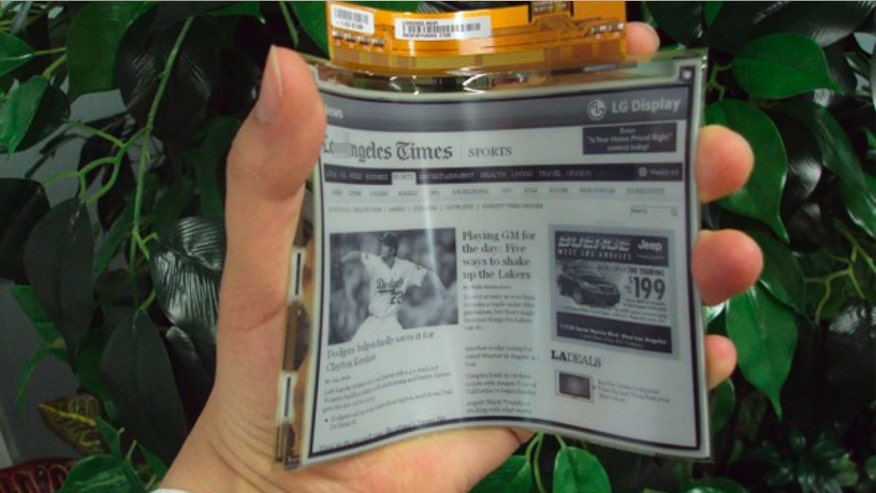
It's also nearly impossible to find a physical place where you could test it without making an appointment. There are few things I want more than a product like this to succeed. I have had a couple of Microsoft Surface products, and they are amazing. Game changing even. But nothing beats e-ink as far as being pleasant on the eyes for extended periods of times.
I've been trying to move from books to e-books, just because I don't have a lot of space to keep books anymore. For non-technical books, a Kindle suffices. But for anything even slightly technical everything falls short. Nothing comes close to the experience of physical books. The surface is the closest for me, but even that the software available for making annotations on it is lackluster, and just staring at a screen too long is not pleasant. This sort of large e-ink tablets I hope are the solution, but their popularity being so lackluster, makes me think that those that have spent the money aren't quite happy with it.
I wish more products like this keep coming out until one sticks.