After upgrading our app's dependency chain to run native arm64 builds (which took a bit of googling) webpack's incremental build time on our app is down to 116ms from 983ms on my 2016 Macbook Pro. Over 8x faster.
Our Tensorflow.js (webgl) models that previously ran about 8fps in the browser are now running at the camera's native 30fps framerate. (Similar to my desktop 2080ti.)
Got mine last week and not only is it faster, the power usage is crazy good. I took it to town for the first time yesterday, thought I'd do some coding between meetings for a few hours. Battery is still over 90%. I actually don't know what the thing sounds like with fans on, because it hasn't happened yet. My old machine from 2019 would have been down to half power at least, and the fans used to come on with just two monitors plugged in and not much workload.
I think I'm missing out as mine drops by a very pedestrian 10% an hour. WindowServer keeps using a cool 4% of the CPU at all times, even when nothing is running.
I had it even worse only 5 hours of battery life in my first week of usage. It turned out OneDrive had a bug with syncing; after reinstalling (then keeping it on overnight for the sync to finish), the battery jumped to ~8-10 hours with fairly heavy usage (Parallels + Safari, though with syncing paused), which is near your current level. The Energy tab of the Activity Monitor helped me identify OneDrive as the power suck.
How are you measuring CPU usage? Presumably whatever monitoring tool you're looking at needs to redraw itself, and that's going to bring in WindowServer…
(FWIW, my WindowServer usage is generally around 3-8% when idling and I am losing about 6% an hour at the moment.)
I am not 2021 macbook pro's yet but on 2020 M1 VS Code doesn't have higher than usual impact on battery. Atleast I, with 7-8 active vscode windows throughout the day, couldn't notice.
I’ve wondered for a while if the fans coming on due to dual monitors is a software / driver issue that could be fixed by a patch. It would save me from buying a new machine right now.
Rather than switching hardware, you can also switch out the software to more efficient one. esbuild would make your builds go sub-ms even without needing a M1 CPU, also worth a try if you cannot switch to the newest hardware, so I guess this comment is for poor people.
Why not both? I can honestly say that I didn't know how bad the 2019 MBP Intel CPUs are until I tried a M1. It's streets ahead.
I don't think people will be moving away from webpack for awhile, but transpilation is often a very expensive part, and `swc` is very near to stable, and as a transpiler / polyfilling tool it's pretty fast.
Because buying new stuff is wasteful and only a temporary solution to the problem?
Look, I like nice, fast machine as much as the rest of the crowd here, but let's not kid ourselves. In a years time the software we run on it will have become even more bloated and things will be just as slow as they were. And then a new machine comes out we all want to buy that.
There will be some ecstatic blog posts again. Which is weird, I think. Needing a faster machine for you daily work should feel like defeat for a developer.
If you need a new laptop and can afford it, by all means go ahead and indulge. In the mean time, I am typing this from a 7 year old Latitude that I use every day for software development and that shows no sign of aging, apart from some scratches. And each time I read a post like this I wonder: what do these people _do_ with these machines?
> And each time I read a post like this I wonder: what do these people _do_ with these machines?
To give you an idea, I don't have Macs, but I have a beefy desktop because I run my own OpenStreetMap server on it.
My old machine: i7 3770, 32GB ram, 1 TB sata SSD: 3 days to import Europe's map.
The new one: Ryzen 5800, 32GB ram, 1 TB NVME: 10 hours to import Europe's map.
I will probably need to upgrade my ram and NVME capacity if I want to build a world map.
Generate map tiles, throw lots of queries at a local Overpass API, run custom large-scale analysis, develop a geocoding service, serve routing calculations... Many applications that public servers will let one query at sample scales, but for which serious use requires setting up one's own servers.
I am still on an i5 11" MacBook Air made of aluminum from Mid 2012 with 4GB RAM. Changed the battery twice, upgraded to a larger SSD once. I was considering buying a new laptop a few years ago, but that thing has served me so well despite falling to the ground unprotected about 3 times and being old. I do embedded and some web programming. I will use it until I am no longer able to start it up. And at that point, I will probably open it up and have a very last try at fixing it.
Wouldn’t you need to change your entire build processes if you followed this route? I don’t do a lot of this type of dev but my understanding is esbuild wouldn't handle polyfill, for example.
Good thing I never said esbuild is "simply" "more efficient webpack". Parent was talking about build times, probably bulk of that is spent building JS, which you can plug in esbuild to handle instead.
ESBuild doesn't polyfill, so it's _really_ not a decent replacement, unless you want to keep track of which JS object features are available in which targets and import those manually yourself?
It was mostly stuff specific to our specific situation.
We were still on node 12 because, until recently, Google Cloud Functions didn’t support anything newer. But when I installed it, I noticed it was running on x86 via Rosetta. So I upgraded to the latest node (17) which installed as native arm64.
Almost everything “just worked” but there were build errors with installing: webpack, node-sass, gprc, and node-canvas.
Webpack turned out to be an issue with node current (17) so downgrading to lts (which is currently 16) worked.
That seems to have magically fixed the gprc build too.
We weren't actually using node-sass anymore; so removed that dependency.
Upgrading node-canvas to 2.8.0 and building from source (after installing its dependencies via homebrew) seems to have worked.
All in all it took maybe 2 hours to follow all the rabbit holes. And our whole engineering team is going to move over to arm64 as soon as Apple can deliver their machines.
And if its anything like my regular M1, it does that while remaining cold. I used a 2019 macbook pro and the thing would be roasting hot if you had docker running.
I've gotten M1 Pro to heat up and require active cooling, unlike M1. It's certainly no space heater like my Intel Core i9 work laptop, but you can push it pretty hard.
I can’t wait for the desktop-class Pro hardware. If you extrapolate on power consumption alone it would be a complete monster. They could do something gnarly like fit 8 sockets on a single board and send your compute ability to level 9000.
I’m hoping for a mid-tier unit though - a rebirth of the G4 Cube as a “Mac Mini Pro”
I daily drive an M1 mini now and abuse the hell out of it. I’ve never heard the fan. It’s a remarkable device. I was installing a Homebrew package the other day on my i7 MacBook Pro and the fans kicked on - it almost startled me - I had forgotten about active cooling.
> They could do something gnarly like fit 8 sockets on a single board
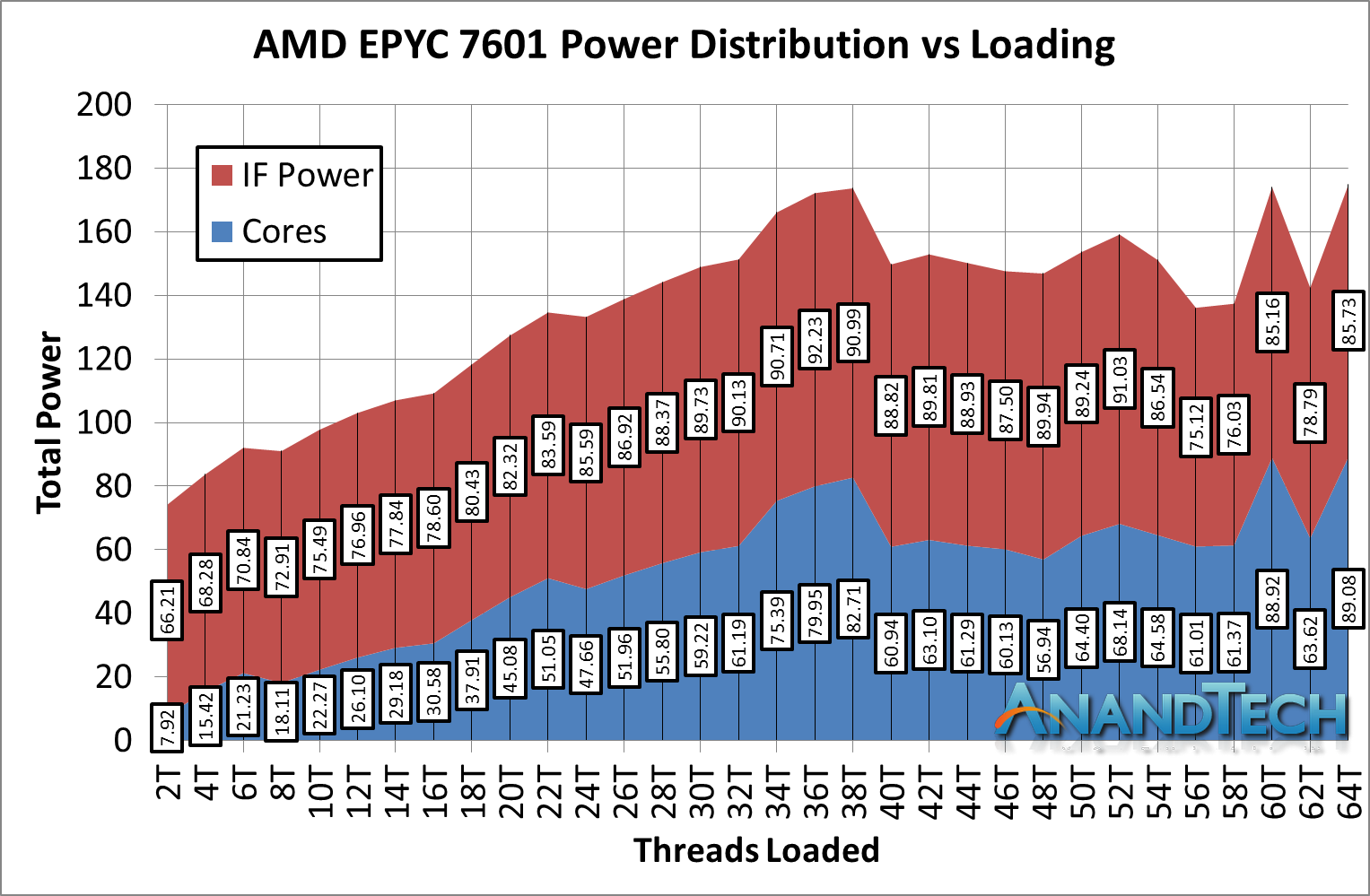
Those sockets need to communicate with each other, and extremely quickly. And that I/O is very, very expensive in terms of power. Even with that you still end up with poor performance scaling, especially with anything that isn't numa aware (which almost nothing is)
So no, that extrapolation doesn't make sense. But even ignoring that missing cost, 8x M1 Max's would be ~800w, give or take. That would work in a Mac Pro replacement, but that'd still be a significant power increase over many of the existing models.
Interesting idea about the power usage of the interconnect. I don't remember this being discussed as an issue in tech press writings about multisocket Xeon or EPYC systems. Do you happen to have any references?
And that's only for a 2p setup. An 8p setup would need even more interconnects per CPU depending on the architecture (eg, ring, mesh, etc..), which would have further impacts to performance depending on which tradeoffs are made.
That will be one of those shut up and take my money moment. Given how they have been going retro or paying tribute to past design in their recent new product lineup I am hoping a G4 Cube revival is actually within a possibility.
Apple has been on a weird spree of ”hey what if we listened to our customers”. Maybe they’ll add in the ”normal” desktop computer. The iMac comes with a screen I don’t want (+weird laptop-like compromises for thinness), the mac mini is too small for actual HP, and the mac pro cost a ton
I believe we are most likely going to see a Mac Mini Pro or the return of the Trashcan Mac Pro instead of a tower Mac Pro.
Replicating the capabilities of the Mac Pro with would require another model of M1 and for the volumes the Mac Pro sells I do not believe developing a dedicated lithography mask makes sense. Besides, most of the unique capabilities of the Mac Pro are divergent with vision of the M1:
- PCIe slots, there are no GPUs compatible with Arm Mac and some of the functionality of the Afterburner card has been integrated into the M1 Max
- Lots of RAM, as seen with the lower RAM models of Mac Book (Air) Apple is increasingly relying on swapping to the fast SSD.
I keep hearing this on HN and I do not buy it. The initial cost is much much greater than the competition and even at lower power draw, I don't see it being competitive.
And I don't think Apple would even want to be competitive in this segment.
Apple will not enter the server chip market, hell Apple is not even selling any B2B products, and Jobs was always very vocal about how he doesn't like B2B.
I know that AWS already have their own ARM chips: https://aws.amazon.com/ec2/graviton/. I don't know about chips enough to understand how large is the gap between AWS and Apple when it comes to designing chips though.
I run arm servers in production. M1 performance core performance is about 3x graviton 2 and 2.5x ampere ultra in our stack. The efficiency core is about 0.6 graviton and a bit less than half ampere.
Would love to have reasonably costed m1 instances but the value play for us is ampere.
That... is not how CPUs work, despite Apple's promises. As mentioned, there is a need of an interconnect between those sockets. Power usage aside, it is absolute hell to get it to efficiently and quickly send data between cores. Adding a socket interconnect will destroy the performance of any task that needs to send data between those cores.
So, what you're left with, is a 64 core M1. Which is still going to be less efficient than a Threadripper, an EPYC or even a Xeon (and that's quite sad) at multithreaded tasks, and, knowing Apple, about twice as expensive.
I have noticed that threads running at the Utility QoS level perform a lot more consistently on the M1 than they do on Intel. Utility being the lowest libdispatch QoS level that still gets scheduled on a P core.
For example, a piece of code I was optimizing recently ran with very little variation in time between runs on my M1 system, but had ~30% variation on a similarly loaded Intel Mac. Changing the QoS level to Default instead of Utility allowed the Intel Mac to perform much more consistently on the benchmark, but made no difference on the M1 (I have good reason to leave it at Utility in my actual application, but for benchmarking it made sense to try other levels).
I found it hard to tell from the article, but it sounds like on the M1 Pro maybe the two highest QoS levels (interactive and user initiated) now preferably map to p cores 0-3, and maybe now default and utility map to p cores 4-7, and then background gets the e cores?
Have you noticed whether `nice(1)` also triggers these QoS change, or is it limited to libdispatch?
> it sounds like on the M1 Pro maybe the two highest QoS levels (interactive and user initiated) now preferably map to p cores 0-3, and maybe now default and utility map to p cores 4-7
That seems unlikely, though I don't have an M1* device what feels more likely is that the two clusters are independently powered (the turbo-ing works on a cluster basis so that's almost certain), therefore the machine favors fully loading the first one before it starts "spilling" to the second (and thus has to power it up).
In my usage, which is game development with Unity, I haven't really been particularly impressed with the performance improvements on my 10-core M1 Pro machine. I'm sure most of the blame is due to Unity (the app is a buggy mess), but it definitely took the initial "wow this is magic" down to reality very quickly for me.
With that said, there is a huge M1 hype on HN. It reminds me of the 64-bit ARM hype when someone benchmaked encryption (because ARMv8 has AES instructions) and everyone were made to belive that the new iPhone would be 3-4 times faster.
The main thing driving this is that people are comparing a new M1 to their Intel Mac laptops with processors from ~2016 and then naturally it's a marked improvement because it's being compared to a five year old machine.
You compare them to a modern Intel or AMD system and they're competitive. They win some and lose others. Much was made about the M1 Max taking the single thread performance crown; for less than a month. Golden Cove from Intel just took it back. It's plausible that it will be AMD's again in a couple months when we get Zen 3 with 3D V-Cache.
They're all within single digit percentages of each other and the winner is whoever released their top end processor most recently.
>Much was made about the M1 Max taking the single thread performance crown; for less than a month.
This is quite misleading in multiple ways.
The M1 Max has the same single thread performance as the M1, which has been out for around a year.
You're also comparing Intel's latest desktop CPU to a laptop CPU. Before the M1, a laptop CPU competing with the highest-end consumer desktop CPU in multi-core OR single-core was unthinkable and had never happened. Yes, there have been leaks in which Alder Lake's mobile CPU beats the M1, but we don't know whether these benchmarks are representing the numbers we'll be seeing in consumer laptops with laptop cooling.
That being said, I hope there will be competition!
AMDs Renoir stood up to desktop CPUs some 6 months before the M1. Still yeah, the M1 is a performance beast. But like others have said already, in the latest gen (and considering Alder Lake is fresh out of the oven[0]), they're all quite close, trading blows with each other.
> You compare them to a modern Intel or AMD system
I compared my 2014 MBP to 2019 MBP and there was no marked difference. It was running hot and eating battery very fast. 2019 Intel Mac and 2020 M1 Mac are two completely different animals. Also, the price drop for a better-performing machine was jaw-dropping.
Apple selling you mid-range-3-year-old-intel CPUs (that are known to thermal throttle quite badly) at 50% markup, then robbing you slightly less hard on a product is not jaw dropping, it's merely you falling for their marketing three times in a row.
The i9-9980HK (released April 2019) in the 16" 2019 Macbook Pro looks like the highest-end mobile i9 Intel had released as of November 2019 when the laptop launched.
And the i7-9750H in the base model was also launched in April of that year, and looks like it was their 2nd-fastest mobile hexacore i7 at the time?
I just got a Lenovo Blue Phantom w/ Ryzen 5800H and 3050TI for 999 USD. 3.2ghz 8c/16t Ryzen 3. Feels amazing even with Win11 on it and I am going from a Dell G3 i5 9300H with 1660TI QMax and its a very tangible feeling upgrade. (even if the OS is a downgrade lol). I did have to do 40 USD memory upgrade to get it to 16g Dual channel so 1039 USD + tax so there is a hidden extra cost there. Or you could do a 32gb upgrade kit instead and sell your 8gb stick.
I don't think the GPU is much of an upgrade, but it does have tensor cores, the better video encoder (could be an OBS monster) and I believe better thermals. I am sure putting Pop!_OS or Manjaro on it would make this a great *nix platform for developers, content creators or streamers.
Correct me if I'm wrong but the screen is not nearly as good,1080p vs 3K, worse color spectrum, worse contrast. The fan noise is typical of gaming laptop while under load although M1 pro stays mostly inaudible. I haven't checked but I doubt the battery life can be compared as well.
If portability/battery longevity and a high resolution is what you are after, there is always going to be a tradeoff. The monitor on my new laptop is 165hz IPS sRGB and I couldn't care less about build in monitor only doing 1080p vs Retina/4k. But I am willing to get more of what is more important to me vs what apple offers. If I get an M1 it will be a Mini, not a laptop. And if I need 4k I just output to an external monitor in docked mode anyways.
Trying to find a cheaper apple quality device that is as good... you'll really be limited to the cheaper Yoga 4k screen models and their ilk. But I have no experience with those devices.
I definately have to pay more for a similar to a maxxed out Macbook Pro 14" specced Ryzen driven Laptop in Germany. Due to current graphic card prizes Desktop is even worse. Can't say that I feel robbed buying a MBPro when Linux runs on it while I felt that immedeately buying a Tigerlake Notebook.
Power usage doesn’t scale linearly, at all. Mobile Ryzens are very competitive with the M1 watt for watt (trading blows with Ryzen winning sometimes). Seems you’ve fallen for Apple marketing again.
What Ryzen laptop would you recommend with performance and battery life roughly equivalent to an M1 MacBook Air? A lot of people on HN obsess over benchmarks, but people buy laptops, not CPUs. I haven’t yet seen a product that’s competitive with the M1 MacBook Air in its niche (which to be fair isn’t really a niche - a laptop for what 90% of people use their laptops for).
I haven’t yet seen a product that’s competitive with the M1 MacBook Air in its niche
This is the inconvenient truth of these discussions. If anything, Apple is under playing the bang for the buck and performance per watt of these machines.
I am very Interested in a good mobile Windows/Ryzen laptop with a MacBook Air-comparable form factor, performance, and battery life. Please link if you know of one.
All the Intel machines I've looked into have fans and still manage to be 30-50% slower.
Me too. Let me know if you find one. If I was in the market for something like the MacBook Air, I’d definitely get the MacBook Air.
I’m fact I use an M1 iPad right now. It’s great. For browsing Facebook and video calls and doing remote work, it’s perfect. And for serious workloads, those go straight to my desktop workstation (AMD). Best of both worlds.
Ryzen is at a process disadvantage currently so Apple should be more efficient on average. When AMD gets on N5 (soon), it's going to be even more competitive.
But don't compare to the modern desktops, only laptops. I often see that people want to compare new M1 to the latest desktops (hot and power-greedy), then say "well, just a little bit better in that benchmark" and think that it was a good and fair comparison :)
I mean, yes, somewhat, in (almost comically) high power desktop configurations, depending on which benchmark you believe. This is of cold comfort to anyone who wants a fast laptop, though.
It is not an "HN thing". These machines are damn fast in day to day use. Absolutely zero heat, zero usage of fans and incredible battery life too. I see a lot of hype and fanboys around here regarding certain techs, but these machines are objectively on a whole different league.
Do you have one of the M1 Pros? Mine very much does gets hot and I can definitely hear the fans when I'm building a project, but both fronts are certainly improved vs the Intel Macs. Honestly, it gets about as hot and as loud as the Intel version, just far less frequently.
Huh, I made a comment about this issue just the other day (https://news.ycombinator.com/item?id=28988835) and had 5 commentators telling me that it has now been fixed, almost made me order a M1. But now you're saying it actually still runs as hot as before?
You need to rephrase your question. Does M1 (any M1) still hit 90+°C at full utilization? Yes it does. Does the machine itself get warm/hot when working hard? The Air, yes (plain M1 but no fan). The 13" Pro, not really (plain M1 and has fan). The larger Pros, yes (have fans, but more powerful M1s).
Do the machines get unbearably hot? Depends on what you consider unbearable. For some people, apparently not.
I have a m1 max and before it a 2020 m1, I still use an Intel i9 for work. With the M1s my fans only go on if Im gaming or using apps that are CPU intensive through Rosetta 2. My intel machine sounds like a leaf blower by comparison
To get the most energy efficiency out of the M1s is to use binaries/programs that have been specifically compiled for the M1.
I've seen little to no hype based on synthetic benchmarks.
M1 macs are just really damn fast for daily usage.
My M1 Macbook Air blows my 16" out of the water in every conceivable way. I'd elaborate but there seriously isn't any dimension of it that isn't an improvement. Maybe the smaller display?
That is the issue though. Intel macbooks were notoriously badly cooled. That hurts the performance a lot. If all you have used is that, of course you find the new one a lot better. However, compared to any other high end Intel/AMD laptop, you would not perceive this much difference in speed.
Pick up a Macbook 16 and XPS 15 from 2019 with the same specs (CPU/RAM) and the XPS absolutely runs circles around the macbook when it comes to general responsiveness in UI. All because of cooling.
> Pick up a Macbook 16 and XPS 15 from 2019 with the same specs (CPU/RAM) and the XPS absolutely runs circles around the macbook when it comes to general responsiveness in UI. All because of cooling.
One visit to XPS owner’s subreddit was enough for me to stop entertaining the idea of buying it.
One visit to Louis Rossmann YouTube channel Louis was enough for me to stop entertaining the idea of buying Apple laptops. It's almost like people that have no problems don't go around saying that (except for Apple users)
And weirdly one of the major design changes for the new M1 Pro & Max machines were significantly improved cooling. Weird how suddenly Apple cared about airflow when it was their 100w SoC in the machine instead of Intel's....
I am sorry, i have a 10th gen dell precision for work. an absolute horror. if i am working on anything development, the fans are just so loud. absolute crap battery life.
if i run same vscode dotnetcore workload on m1 air, that thing lasts atleast 10hours on battery and no heat whatsover. better, the compile time is usually faster than 3800 bucks worth dell precision (on a 1200 bucks laptop)
Second the MBP 16" was the one with the improved cooling, so it wasn't throttled randomly by using the wrong charging port.
And finally the whole reason the M1s are so well cooled is there's no 100W SoC, or 200W probably when you consider the additional dedicated GPU in my 16".
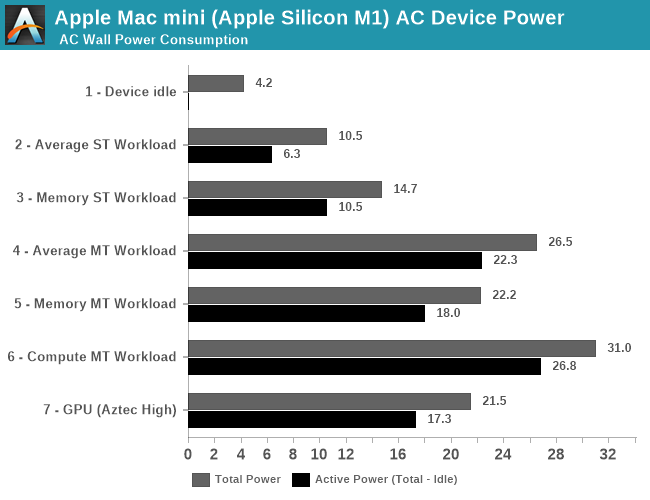
My M1 has a 10W TDP!
10!
I don't think the GPU alone in my 16" could have been cooled by a solution handling 10W.
-
Also note: in your other comments you keep mixing TDP and wall power draw, my 16" would have had higher wall power than my M1 Air by far.
Your M1 Air doesn't have an M1 Pro or Max, either, which I clearly specified. Why are you talking about M1 power draw in your response when that's not the SoC in question?
> Also note: in your other comments you keep mixing TDP and wall power draw,
Power in == heat out. CPUs don't do mechanical work, all power is converted to heat.
If the 'TDP' is less than peak power draw (and is actually respected in some form), it simply means the SoC is intended to power throttle after a duration. But that's so far not the case for any of the M1's, so claimed TDP is fully irrelevant as it's seemingly not enforced in any way. Which isn't unique to Apple fwiw, AMD's claimed TDPs are equally irrelevant.
Because the thread was about why even an M1 not pro is beating a 16"?
You're free to bring in your third option which clobbers it even further, but an $800 fanless machine also clobbers it so it's a perfectly valid comparison when trying to counter weird claims that Apple only just now started working on proper cooling...
tl;dr: How can you claim the old 16" is only being beat because Apple just now started to care about cooling when a fanless machine also beats it?
-
Also TDP is an advertising figure but when you're talking about orders of magnitude it's a perfectly fine way to talk about parts as long as you stay consistent in TDP vs wall draw
Wall draw to wall draw, my M1 Air draws under 30W and beats a 16" drawing over 100W
TDP to TDP my M1 is 10W to a 16" closer to 100W.
In both cases it should be obvious why cooling is less of an issue...
> Also TDP is an advertising figure but when you're talking about orders of magnitude it's a perfectly fine way to talk about parts as long as you stay consistent in TDP vs wall draw
This is completely incorrect. You cannot compare TDPs in any meaningful way except kinda within a single vendor's single generation. There's no standard definition for TDP, so it cannot be generally compared across brands.
And for most brands TDP doesn't have any useful meaning, further eliminating any value to be had from it.
> Wall draw to wall draw, my M1 Air draws under 30W and beats a 16" drawing over 100W
Are you sure? What workload(s)? How did you measure power draw? And 16" isn't a CPU/SoC, so what are you even comparing against? Your M1 Air sure as shit isn't beating the current 100w 16" after all. So I'm guessing you're comparing against a previous MBP 16" of some unknown variety, which one specifically in which configuration?
> TDP to TDP my M1 is 10W to a 16" closer to 100W.
Apple never shipped an Intel CPU with a 100w TDP in any MBP of any size. So not only is this comparison meaningless, you're not even using the right numbers. The i9-9980HK that I'm guessing you're referring to is a 45w TDP. But see above about you can't compare TDPs, they have no meaning.
Totally agree. And so many of the changes that people are enjoying about the new MacBooks (namely reverting Apple's failed experiments like TouchBar, only USB-C ports, and the butterfly keyboard) were all introduced alongside Apple Silicon. Not saying I blame them — it makes a ton of sense from a business/product marketing perspective, especially bundling the new display too.
The 16" MBP already had the thermal design improvements, there was a firmware issue for a short time after release that caused the thermal throttling, after they fixed that it was on par with the XPS with the same chip.
The older ones got really toasty, but it's not like the XPS faired better in the thermal design department.
Both these had their own quirks, (I returned the XPS I got from my place of work twice because I couldn't stand the insane amount of coil whine)
Been running the 2019 MBP since it was released and it's been a pretty pleasant experience overal. Only issue I've had was with external displays drawing too much power, which was fixed by forcing the refresh rate to 59.98Hz.
100 watts? That implies that with serious use you could burn the battery to zero in an hour. Apple's graphs don't show more than 60 watts at peak, and no one is reporting heavy fan output even when running extended benchmarks.
> Finally, stressing out both CPU and GPU at the same time, the SoC goes up to 92W package power and 120W wall active power.
2. Yes, you can burn the battery quickly under heavy use. I've killed it easily in about 2 hours during heavy Unity work.
3. When I was doing that, I did experience heavy fan output, about as loud and as hot as my 2018 15" MacBook Pro. After the heavy utilization stopped, it cooled down much more quickly than the older Intel machine.
The 14-inch MBP with M1 Pro (not Max) burns 69W under full load (including GPU), so it does run through its 70Wh battery in 1 hour and 9 minutes[1]. (The 16-inch Notebookcheck review is not published yet.)
There are reviews where they actually burn through the battery in an hour. This is not surprising: the M1 Max model can consume 70 watts, plus the display consumes tens of watts in HDR mode.
What a load of shit lol. The XPS 15 9570 has similar throttling issues, down to the same fixes as a MBP 16 (undervolting, disabling HT, putting pads on the VRMs, redoing the paste)
I was considering an XPS and read through the Dell subreddits. People were constantly complaining how their machine was throttled and even opened it up to apply better cooling paste, undervolted it and so on.
I have a hard time believing that one company is doing miracle work in a small and light laptop. That's also true in the other direction - I don't really believe that Apple's machines deliver desktop performance on battery remaining cool and quiet over longer times...
The one thing where M processors absolutely excel compared to competition is what you call "general responsiveness in UI", and it is not just the hardware but how they optimised it with their OS because now they have control over the whole stack.
My XPS' thermals are a disaster. After 5 minutes of any remotely intensive game, the UI became a slideshow, unusable even for basic browsing for a few minutes after closing the game.
I hope they improved in 2019, mine was only from a year before that.
I wonder how much of that is due to a "finally, a good laptop" sentiment. I have used a lot of laptops over the years, and each and every one of them have been terrible in lots of ways, especially recently. If M1s "solve" the laptop problem, that would be great.
They pretty much do. The M1 macbook is, unironically, the first laptop I've had that doesn't have any glitches.
It's less powerful than a modern desktop, but not by much. More importantly, none of the power management, suspend, wifi, whatever... ever seems to fail.
Don't you think it's deserved? I haven't seriously used a macbook in nearly a decade now but the M1 is making me consider buying one. Desktop class performance in a laptop with very long battery life is just amazing. The only thing stopping me is OS X. Using it is super painful for me - it doesn't even have basic snap to edge or split window functionality. My workflow is heavily dependent on tiling WMs and it would affect my productivity.
You can run linux on it if you want, for most productivity related issues there are open source tools like [Rectangle](https://rectangleapp.com) for what you're talking about.
other tools like the Dash app are also amazing tools to speed up the development process. It will take some getting used to moving from Windows and to a far lesser extent linux, however with the right tools for the job you will end up being more productive and less frustrated. Especially compared to Windows.
Unless I need something that specifically only runs on Windows, I would use Mac/Linux over it any day of the week. For productivity it's Mac > Linux >>> Windows for me.
Yeah I'm familiar with what is in OS X, I have had to use it a few times for work. The fullscreen approach is very clunky. And the window animations are incredibly slow. I'm used to dynamically moving windows around and tiling things quickly. I tried using yabai but it was so slow and buggy there was no point. I think magnet/rectangle helps but it is still a subpar experience.
I tried getting Macs to work for years with yabai etc and came to the same conclusion as you. It's garbage for my workflows. Linux is a million times better.
I decided to get a fully spec'd out Thinkpad X13 AMD 2nd gen instead - 32gb ram, 1TB ssd, 8/16 cores, 16:10 2k screen. All for the whopping price of 1k GBP, a third the price of a similarly spec'd MBP.
I’m still personally seeing quite a bit better performance on my old laptop with a dedicated gpu in Unity 21.2 - but the power draw is much much lower (consequently better battery life) on the Mac side which definitely has its place.
Are you comparing Windows vs Mac? If so I think that might have even more to do with perf than the hardware. I'm sure the overwhelming majority of Unity developers use it on Windows, and so it probably gets more love from Unity as a result.
I am curious, since Intel is relying more and more on P and E cores as well, is there any reference or research available for optimizing multithreaded userland process tasks with varying QoS?
A lot of the pthreads books I see are from the late 90s. Is there a more recent reference? What's the best way to write cross-platform (e.g. not Grand Central Dispatch) multithreaded apps with these new chip architectures?
Thank you for sharing this, it's interesting - I've also gotten the impression (but lack citation) that Intel E cores are targeted at thermal isolation instead of power minimization as the M1 may target.
If this is happening on Xeons, it's probably happening on consumer dies as well, in addition to other non-obvious power/performance optimizations. Perhaps this is why Alder Lake is pumping up the TDP[1]?
> They move everything that isn't foreground to an efficiency core, which is awful for compiling or video processing.
Windows has had that (foreground boost) for a long time, Intel probably piggybacks on it. It'll be interesting to see how it will behave on Linux, which AFAIK never had that mechanism (except perhaps on Android).
For Linux, I believe it will dispatch based on the niceness level and overall CPU utilization - past a certain threshold, it will start putting work at default or higher priority onto the performance cores.
For the Mac, I believe you have equivalent access for scheduling between posix and GCD, but the scheduling configuration is likely way more approachable in GCD.
Also: On M1, there is an added capability to run in a stricter memory model to speed up x86_64 emulation. This only is available on the performance cores, which is one of the reasons people observe non-native code draining the battery quicker.
Saying that the M1's cores are homogenous is pretty misleading / confusing as the icestorm and firestorm cores are rather different. big.LITTLE/DIQ-type architectures are usually considered heterogenous even if all the actors share an ISA (because you can't treat all the cores
Yeah, when I said "homogenous" I was solely referring to the ISA. Trying to enable TSO on a Tempest core will fail with an undefined instruction exception, but I think A12Z is ISA homogenous in userspace.
Yeah, but I'd bet 90% of that research makes wacky assumptions that don't apply to real processors. When real hardware becomes available you start over from scratch. (Source: I am a former CS researcher.)
"Surprisingly, these benchmarks seldom exceed 50% load on any of the ten cores, which raises the question of how accurately they represent maximum CPU performance."
Eh, maybe. I'm not inclined to rely on the reported % CPU usage to represent anything useful. For example, it's very easy to be at 100% CPU when you're actually spending most of that time waiting for memory reads.
CPU % is such a complex metric that it hardly means anything real other than an general feel for how busy the system is.
I have seen on linux that I can be running something that uses 100% and the cpu is at 50c, then I run prime95 also at 100% and the cpu instantly hits 99c
In Linux, the actual metric is simple. The amount of time a "CPU" (what Linux calls an architectural thread of execution) is not in the idle routine, as a proportion of the total time elapsed, and average this over all "CPUs" in the system.
It's a simple metric, but it can be complicated to relate it to what is going on with execution because the real system is very complicated.
The CPU % metric does not take into account execution strength, of the CPU, big vs small, dynamic CPU frequency, or effect that one CPU might have on another (e.g., SMT or shared caches or memory controllers).
Further complicating it is that the Linux CPU scheduler is not work-conserving. So you could have at least 100 application threads runnable at any given moment in your workload, but your 64 CPU system might only be hitting 80% CPU busy.
Then you get to application and kernel effects of course, locking, blocking, etc. can mean you don't even have as many runnable threads as you might think.
Then how all this actually relates to the work and heat the system creates is another matter again. Simple integer execution might only use half the CPU power of a vector heavy workload because you have fewer transistors clocked or switching (or even powered) in the core.
The way CPU usage is measured includes time waiting for memory reads. Only a hyperthreaded core would be able to schedule a different task on such a core. For the M1 Pro, which is not hyperthreaded, if all dispatched instructions are waiting for memory reads, then the retired instruction counter simply does not get incremented for that cycle.
Terminology nitpick: SMT, not hyperthreading. Hyperthreading is an Intel trademarked marketing term for their implementation of SMT, like vPro is their term for platform management, etc.
I believe these are actually one of the lowest markups Apple has and in general a great deal.
Consider this:
1. 14” or 16” custom miniLED display
2. Anodized one-piece aluminum clamshell
3. Completely custom SoC (much more expensive than buying Intel’s latest, at least in the short-term)
4. Completely custom OS with a full suite of native apps
5. Custom MagSafe adapter
6. Thunderbolt 4 (3 of them)
Now consider that this laptop outperforms most desktop workstations that cost $4k+…and does it on 16h of battery life.
If you’re in the market for a high-performance computer, you’d have to be dense to not buy one of these (or building x86 firmware)
> Now consider that this laptop outperforms most desktop workstations that cost $4k+…and does it on 16h of battery life.
> If you’re in the market for a high-performance computer, you’d have to be dense to not buy one of these (or building x86 firmware)
I'd love to see which $4000+ desktop gets beaten by any M1 processor. $4000 is A LOT for a desktop computer. I paid (in total, with upgrades over the years) around ~$1600 and easily beats anything provided by Apple.
That seems unlikely. From recent benchmarks you need to go into $1000+ territory for the CPU alone to get close to M1 multi-core performance. And then there’s the GPU, you can’t even get a 2070 for that amount at the moment.
The M1 Max is ahead by leaps and bounds on many tests despite the synthetic score being close. And these only tell half the story. In all the reviews I’ve seen so far, it consistently beats the iMac Pro by up to 2x-4x in real word tasks. Mind you, the original M1 chip already beat many high-end desktops, so this is not surprising at all.
Even if the cpu was that cheap: $600 cpu + $200 mobo + $100 ram + $100 ssd + $50 power supply + $600 rtx 2060
That’s the best machine you can put together with ~$1500 and it will be absolutely smoked by the M1 Pro/Max. Then you can try to find a mini-led 4k 120hz monitor, peripherals, mic and speakers, all for < $1000 (hint: impossible)… and still not be able to run on batteries or pack it in a bag.
The 5950x costs $750, you can buy it on Amazon right now for that. Much less than 1k. Also, you're comparing single thread performance on only one website. In every website it kicks the M1 Pro's ass on multicore, as it should with 16 cores. https://nanoreview.net/en/cpu-compare/apple-m1-pro-vs-amd-ry... It can also beat it by a hair in single core depending on the benchmark.
Don't be disingenuous just to win the argument.
To actually prove your point, you need to look at GPUs. A 3070 is ~$1100, so there we go, already we've broken his $1600 budget, and we have bought none of the other parts (which would total at minimum ~$1000 more).
If you go 5900x plus 3070, you're pretty much right in line with M1 Pro, but it will cost you around $2500 to equal the Macbook pro. So an upcharge of $1000 to $1500 for the price of being a mobile workstation, as well as all the Mac software. Not really unreasonable.
Whether some parts are custom or standard start to lose their meaning in Apple's scale. Probably you're right in the SoC case, reserving that sweet 5nm capacity from TSMC likely costs a lot. But the rest of your list is similar to any Apple device, so it shouldn't factor in the markup difference between these machines and their other products. Even the SoC investment is benefiting the whole product portfolio, even though this version is specific to laptops for now.
Instead of complaining that RAM updates are so expensive, we could frame it as "Apple takes a lower margin on entry level configurations so they can offer the same quality hardware to price concious consumers".
That's also what it was when it was a 2gb increase in RAM. RAM has gotten a lot cheaper per GB than what Apple continues to charge per GB and thats honestly never not the case. Only now its worse, especially when you have developers trapped in docker centric workflows where they need to have more memory, no way around it, and apple decides to raise prices on their already high markup.
Agreed !
We should also differentiate between "expensive" and "good-value for money".
a Ferrari sports car is very 'expensive' and not many ppl can afford it, a Ferrari at 35% discount is a great deal but still 'expensive' for most ppl.
Bringing this back to the M1 Macs, I think what you get for your money in terms of computing, power consumption and build quality is simply amazing ! I think few can argue that.
But in terms of 'absolute money', I def won't be able to afford a new M1 not when a "decent-workhorse" laptop cost about $900-$1400.
Not saying I don't want one ! I absolutely do,but my broke ass can't afford one :/
Ja true was looking at them, but I do like more storage and ram space. To be honest the "best value" is prob on apple refurb store ! Very well priced there.
Compared to what? Their pricing is in-line with the previous Intel models and are a huge upgrade in performance. For some tasks, you have to look at a desktop configuration for comparable performance (at a much higher price).
I couldn't find a monitor with the same spec for less than $4000. The performance is comparable to high ens oc laptop but with better thermal efficiency. If you works with visual, theses are unbeatable value
I’m not sure how to interpret this, even after reading the article. Is any reason given for why the last 4 Performance cores get only a limited amount of work?
I assume that a core cluster can power off if it's completely idle; this should be more energy-efficient than running both clusters at low utilization.
It can also allow for boosting a core more: the “turbo” ramping is on a per-cluster basis so if only one core is loaded it’ll work at 3.2, two of them at 3.1, and 3 or 4 lowers that to 3.0.
That sounds like you'd want to keep both clusters on and spread the work so cores could clock higher. By packing everything onto one cluster, macOS is reducing clocks.
Like sibling comment says, it’s more efficient. It allows those cores to sort of pretend they’re ECs. It also reserves those PCs for bursty workloads which would otherwise be contentious for cache and memory bandwidth in an evenly balanced scheduler.
My guess is it’s treating the “extra” cores as a throttling mechanism without throttling. If your thermal budget is 9 (8 + 2*1/2), and you operate normally with a thermal budget of ~5, you can temporarily go to 9 without any noticeable difference in actual performance, or heat, or cooling. In another sense, they’re probably leaving a lot of performance potential on the table to achieve that perception.
As far as which cores are demoted… I definitely don’t know enough to speculate. If favoring the same set would affect longevity of the device, they’d rotate. If not it’s simpler not to do that. I have no idea which is more likely.
Keep in mind the only devices with M1 Pro/Max CPUs are currently battery-powered laptops (which in itself is quite a strange inversion!)
Probably the "high power" mode available on an M1 Max in a 16" chassis is doing just that. And maybe Apple will decide to treat some kind of new iMac Pro as more of a pro machine, and make it chunky enough to dissipate that sort of heat without needing much fan noise...
Yeah, it was surprising that they didn't pop these SoCs into the Mac Mini but perhaps they are doing a full redesign of the Mini and we'll see a new version some time next year?
Obviously a 'Pro' version of the iMac is coming eventually with a larger screen but I don't think many people expected that yet. Maybe February or so next year...
Laptops command higher margins. They will want to milk the market with their Pro/Max laptops and then release Minis and larger iMacs next year.
Also, even a huge company like Apple would want to stagger releases so design teams can have some constant workload. Releasing laptops and a new Mini and a new iMac would put quite some work on the team and then it would be idle for a time. They are probably done with the Mini and working on a Mac Pro right now.
Any devs here switched from an old 15.4" MBP to a new 14" MBP? I'm curious how you find the screen size for doing work?
My 15.4" can scale to "looks like 1920x1200" and the 14" to "1800x1169" so there's not a lot of difference. Does the smaller size make it feel cramped?
I switched - regretting it and may return mine in favour of the 16". As great as the 14" is (amazing machine), the loss of screen real estate has been felt.
I did not do such a switch, I wondered about the same but in the end I looked at my current devices: a personal 2010 15" at 1680x1050 which has been dying for years now, and a work 14" at 1920x1080 display; the comfort provided by the additional physical real-estate of the 15" way beats the additional logical real-estate of the 14". It took me about 2 days to decide, but in the end I went with a 16", working on the 14" without an external display is really not enjoyable (even ignoring the cramped keyboard).
That the 16" also has more battery and better cooling don't hurt any, but they're the cherry on top.
Can you help me understand what that means? Is it not possible to run it at the "full" resolution? Will it be scaled to what equates to the 1800x1169 that you mention?
That would equate to less "real estate" than what I have on my T460s FHD screen? Of course the screen would be light years ahead to look at. But just sounds a little bit strange with regards to actual pixels/space on the screen?
> Can you help me understand what that means? Is it not possible to run it at the "full" resolution? Will it be scaled to what equates to the 1800x1169 that you mention?
Yes, Apple doesn't provide for running at the native resolution out of the box (utilities like SwitchResX make those options available, though I don't know if they work with the M1s yet), all the display modes they propose are scaled.
Historically there was a default mode at 2x scaling with 2 above and 2 below, apparently on the M1s the default 2x scaling is the second-to-last and you only have one mode above.
So on the 14" with a physical 3024 x 1964 display, the modes provided natively by macOS are:
    1800 x 1169 (1.68x)
    1512 x 982 (2x, default)
    1352 x 878 (2.24x)
    1147 x 745 (2.64x)
    1024 x 665 (2.95x)
Don't ask me why they selected these wonky-ass resolutions aside from the 2x one though. The 1024 one could make some sense but it seems like adjusted luck: the 16" bottoms out at 1168 instead. Could be a question of pixel density I guess but you'd have to run the computation.
I think on older machines you could hold down the option key and get a secret menu that let you set more options - not sure if that's still the case though.
Do you have two 4k displays? If yes, then does running them affects performance significantly? On i9 MBP this was causing extremely severe performance issues, to the point where processor was throttled to 30% performance.
Biggest reason to get 64GB of RAM if you intend to do this - the Unified Memory is shared between the CPU and GPU. More pixels in total that the machine has to render, the more RAM will be needed for the GPUs.
Don't skimp on RAM or buy into the hype that ARM halves the amount of required RAM - it's total BS.
Thanks! Interesting result, baseline performance is impressive (pretty close to my R9 5950X which does 4853/5069 MB/s) but the CRC32 hardware is surprisingly mediocre (Cortex-A72 on Graviton1 does 14840/14483, Neoverse N1 on Graviton2 does 17066/19560)
Is that CPU or GPU? Sounds a bit high when 2Gflops/watt (but I guess at 40W for all cores =2,5Gflops/W it could make sense?!) is the industry standard! Can you turn off the acceleration to get CPU only figures? What is FMA/s?
Edit: Ok that is some sort of SIMD/GPU... I need figures for the raw CPU that can also do general purpose calculations and branches!
Maybe MIPS is a better "apples to apples" measurement?
Ah, it's actually 100gflops (not 100Gfmas) because the fmla instruction is fused.
I just ran it on CPU, single core (no pinning), just using the aarch64 fmla instruction.
Using pure BLAS (multithreaded, with the MM ISA extension), I get like 1.2TFlops in fp32 on the whole device. Code for the blas test: https://jott.live/code/blas_test.cc


After upgrading our app's dependency chain to run native arm64 builds (which took a bit of googling) webpack's incremental build time on our app is down to 116ms from 983ms on my 2016 Macbook Pro. Over 8x faster.
Our Tensorflow.js (webgl) models that previously ran about 8fps in the browser are now running at the camera's native 30fps framerate. (Similar to my desktop 2080ti.)