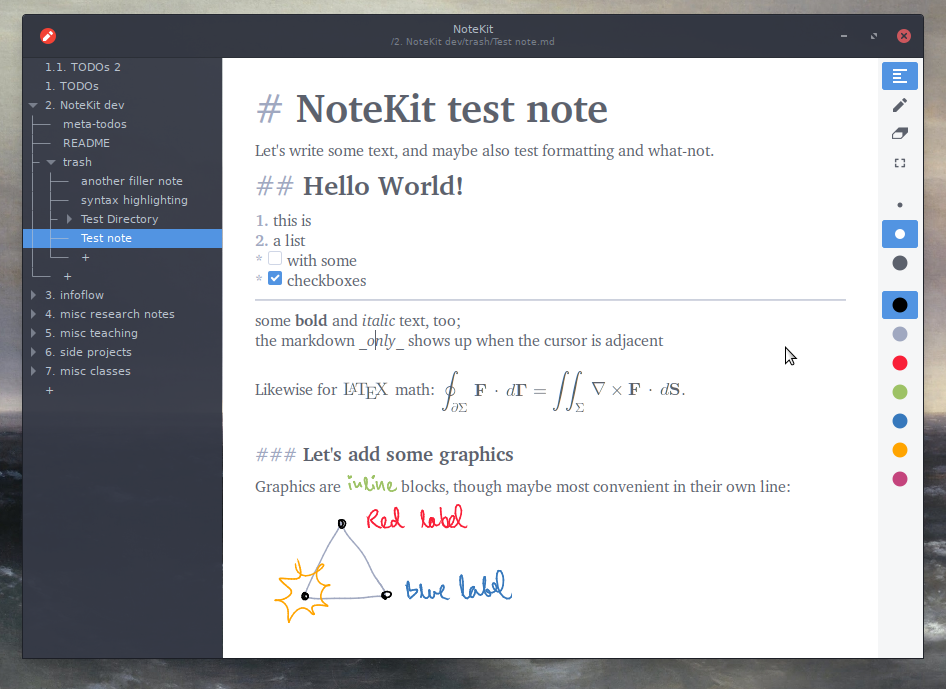
To the best of my knowledge this (Marktext) is the only free/open-source Markdown editor that has WYSIWYG (like Typora: https://typora.io/). Not a separate preview window, but the actual editor window renders each Markdown "block" (paragraph, list item, whatever) except the one you're editing.
I've been working on one (https://github.com/blackhole89/notekit) for a while now (which, unlike the aforementioned, also is not built on Chrome/Electron). Unfortunately it seems to be pretty hard to get the word out, or at least I haven't found any better strategy than to pounce, as I am doing now, whenever I see a HN thread about markdown editors (which invariably wind up having some comment thread lamenting the lack of WYSIWYG and/or non-Electron editors).
I mean the following as feedback to help you find more users, not as critique; I understand where you’re coming from and this is just how I would personally approach it:
What I immediately noticed looking at the README, is that the communication is centered around you and your values, rather than on the end-user:
You mention why you created it, not what it enables the user to do.
You use Linux-lingo, like “free (speech and beer)” which many users are unfamiliar with and don’t know why they should care.
Your installation instructions make it hard for users to pick which one they should choose.
There are no Mac binaries, but Macs are wide-spread among developers.
Windows binaries mention “x64”, which is very technical and might scare users away.
The Ubuntu screenshots make it look like “Linux only”. You could replace it with a Windows or Mac screenshot, to get people to understand it works on their platform.
You could still keep this technical (and potentially alienating) language in your documentation, but simplifying the README to make it easier for the 90% of your potential audience could make it more popular.
You mentioned in this thread that some people don’t want Electron. That’s true, and it’s a great USP for those that require it, but personally I would avoid assuming that it’s the USP that convinces the masses.
Thanks for the feedback! I can certainly try to improve the structure of the README, though I'm not sure if I agree with some of your points about giving more priority to non-Linux users. The thing is, at least in my eyes, Gtk generally feels terrible on platforms where it is not native (I would in fact even avoid using it in a Qt-based Linux desktop setup, just as I avoid Qt-based applications as far as possible in my Gtk-based one), and at any rate the ports are often lacking even in features (for instance, last I checked, Windows Gtk would not allow me to read tablet pressure information). If you are using Windows, and don't care for "free (speech and beer)", why would you even want to use anything other than OneNote? I'm somewhat wary of repeating the mistakes of Firefox (and GNOME) of snubbing a likely target demographic to court an unlikely one.
(Regarding Mac, I unfortunately don't have a Mac and neither does anyone who I know well enough to ask to borrow theirs, though someone did in fact contribute homebrew-based build scripts that supposedly work at some point. I just have no idea how to package the result to make it easy to install.)
- You don't want to give more priority to non-Linux users
- GTK feels terrible on those other platforms
- You don't believe those who care about licensing issues would use it
- You cannot build releases or installers for Mac
The first thing that comes to mind on reading your response is that the non-Linux users are a market you are not really interested in - and even if they were they are not a market you can effectively serve (installers, updates, issues).
You should consider formally abandoning official support for non-Linux, as in reality you don't currently have actual support for them anyway. Be honest, cut your losses, and choose your customers. Cross-platform is not a benefit if it is unsustainable.
Well, it's not exactly unsustainable - the Github CI continues producing those builds without me having to do anything for it (it in fact didn't break even once in the past year, compared to several breakages on the "backwards-compatible" Ubuntu 18.04 deb which happened whenever Github changed something about the package bundle available to that image). If someone reports a bug on Windows, I will look into it, and/or spend some time walking them through a workaround (since I do in fact have access to Windows setups). As I see it, in the most natural sense of support, I do have support for Windows, even though it is what I guess you would call Tier 2 support.
To nitpick a little, I also didn't say I don't think that those who care about licensing issues would use [the Windows build]; rather, I think that those who don't care about licensing issues and are on Windows would not use it, because there is a Windows-only product that is closed-source which I am unlikely to be able to compete with on that ground.
> The Ubuntu screenshots make it look like “Linux only”. You could replace it with a Windows or Mac screenshot, to get people to understand it works on their platform.
Replace? I'm not Linux user but this sounds strange to me. He did native GTK app and he should not be considering Linux users?
This looks interesting, and is actually the first of these kinds editors that I'll be trying in a very long time. I got kind of jaded with the Electron experience and always go back to nvim. Of course, the WYSIWYG experience isn't as nice in nvim, but that's not that high of a priority for me.
In regard to getting the word out, it depends on the kind of person you want to reach. If you really want to reach a "general" public, the sibling's comments sound useful, in particular binary availability.
In particular for Windows. I've clicked on the link, ended up on the GH workflows page, looked around quickly, didn't see where to grab the binary and went on my way being happy that I'm on Arch Linux and there's a package in the AUR.
Yeah, the way Windows builds are made available at the moment is honestly pretty bad, and I should improve on that. There is the problem that you need to be logged in to download that particular type of CI artifact, and more generally that the archive is somewhat bloated because the build scripts have no notion of what parts of Gtk actually need to be bundled (and so they wind up including an excess of random icons and what-not).
I don't know if I want to reach what you would call the "general public" (at least not until the program is quite a bit more polished than it is now), but I'd certainly want to reach typical Linux-using HN posters who are interested in Markdown notetaking, and the circumstance that this subthread played out as it did implies I haven't yet done so.
I have to tell you that your approach is the only one I can work with: change the display of text based on the semantic level (title, emphasis, etc) _but_ keep the formatting visible so you can easily edit it. If it's not there, no markdown editor makes it easy to e.g change a level 1 title to a level 2 title, apart from having to reach to the mouse.
At this age, it's hard to use something that can't sync the content between cross platform devices and the GH issue for mobile support is lingering for 3 years.
Who's good to only write stuff on a computer and on that alone?
Best solution to me so far is to just use Wiki.js.
I hadn't seen Emacs's markdown-mode's markdown-hide-markup before, but trying it just now, it goes too far and has the opposite problem: it's harder to see the markup when you do want it. What Typora and MarkText (and, from the replies above, NoteKit) do is to show the markup around the cursor. (See the screenshot from NoteKit: https://raw.githubusercontent.com/blackhole89/notekit/6d6278... ) This seems to be missing in some "WYSYWIG-only" editors. I think it may be possible to implement that in Emacs, but no one seems to have done it so far.
I recommend something like Obsidian instead which is a markdown editor (newly upgraded) along with an entire knowledge base and note taking system that can create and maintain references across files.
MarkText is free and open source (MIT License) while Obsidian is closed source, which is an important distinction for some users.
Some of the other alternatives mentioned here, like Zettlr[1] and Dendron,[2] would be more suitable for users who prefer to handle their Markdown documents and notes with FOSS.
I feel obligated to mention Logseq https://logseq.com/ as well as Zettlr https://www.zettlr.com/ which are both markdown editors with knowledge base and management. Incidentally, I do all of this in Emacs.
Here's the thing: I really like Loqseq's interface (it mimic's Andy Matuschak's Evergreen notes[0]) but I really hate the fact that it doesn't let me edit plain Markdown files and write free-form text. (Looks like I'm not the only one[1].) It forces me into this weird outliner format that I personally don't like at all – and I'm saying this as someone who used org-mode for years.
Hmm, OTOH the _only_ reason I like LogSeq is because of the outliner format.
I think there are a lot of different styles out there which manifest in how different people end up using these tools.
I ended up moving from Obsidian to Logseq basically just to get "native outline format", and LogSeq is in that sense an "offline, open-format version of Roam".
I'll have to look into all of these. Here's what I really want: A note taking app that lets me insert code cells, a la Jupyter. I'm using colaboratory right now but I'd like to explore alternatives.
I've gotten to the point where I practically can't use an editor that doesn't let me run code, because that's become my second brain.
I do that with org-mode https://orgmode.org/ it's integrated with Emacs and I can run code in the document as well as export to PDF for presentations for example.
Things I want in a markdown editor: Grammar check. Auto-capitalise start of sentence and known proper nouns. Auto fix obvious typos without bothering me. Grammatically smart spellcheck. Detect and flag accidental double space. Detect and flag duplicate words. Word count excluding headlines.
It's nice when I use Google docs and it has that stuff. I wish I had it in markdown.
I thought I wanted a completely stripped down Markdown editor (I currently use Typora, and Notepad++ with plugins). But after reading your list, I agree, these would be very nice to have.
While we are it, I would like a collapsible headings view panel. Jetbrains has this in the markdown editor they include in their products, and it is so damn useful in navigating large files.
The author of marktext will for sure welcome your PRs for all these features! As stated in the README, "Of course, if you submit a PR directly, it will be greatly appreciated."
Don't do this. It's not a demand list, it's a comparison to a competing product. Do you want a PR that's just s/.*/docs.google.com/? That's what you're passive-aggressively asking for.
It's a wish list, but it's full of things I know are hard. Or at least things where the difference between doing them kinda poorly, and doing them with style, is a few billion dollars worth of established natural language processing infrastructure. Google genuinely understands the sentence you're trying to type - for some AI value of "understands". Therefore its suggestions are succinct and sensible.
> That's what you're passive-aggressively asking for.
I don't know if you're wording it way because you're doing a bit or you didn't look at my username?
> you know what is a PR
This part doesn't make sense to me.
> and what is a demand for a free work
And this is not a demand for free work.
If I comment on a project that I'm going to keep using an existing product because it has this big entrenched feature base, that's the exact opposite of being demanding and binding myself to a project. It's an acceptance of the status quo. It gives some feedback as to what people find important, but it's not a request to implement half of google docs, and it doesn't make sense to try to invert it into an invitation to submit a PR that implements half of google docs.
A proper PR (pull request on GitHub, not public relations, just to be clear) contains a working implementation of some feature or a bugfix. Ideally it also follows the style of the said project, is well tested etc.
If somebody opens a "PR" with no source code and the whole body of PR is, for example, "Replace your project with google docs" or even "s/.*/docs.google.com/", that's not a PR, that's wasting project maintainer's time.
If somebody opens a PR that says "Hey could you add feature X?" that's also not a PR. At best that's a feature request.
Just because you don't find it useful, doesn't mean others won't either. I use Marktext on a daily basis and think its a great tool, after comparing it to what's available in OSS. I haven't had any Electron-related issues with it.
The amount of energy used by Electron is minuscule compared to bitcoin mining, electric heating, driving cars, food production, or literally any other activity humans do that I can't tell if you're trolling.
At the moment, I have Mark Text running on my Mac, and it's using 0.0% of a CPU (I have over a dozen processes using more power, totaling about 5% of a CPU).
It's a reasonable choice not to use this (free) product because of disk usage (285MB, which is a lot, although I have 275GB free), memory usage (165MB, although it's compressed to about 65MB) or CPU usage (see above). But others may decide that this app provides great value for the resources used, and that's also a reasonable choice. There's no reason to shut down the discussion.
Why, because it's Electron? I thought the anti-Electron stance had been debunked a while ago, that it's not every Electron app that chews up RAM like crazy, etc.
Electron seems like a great way to get a cross-platform app out there without having to hire three separate departments of code developers.
> it's not every Electron app that chews up RAM like crazy
Let's see, Discord uses 450mb of memory after being open for 3 hours, and Spotify has gone through 1.6gb after 8. If these people with infinite resources at their disposal can't do good resource management, I'm not sure who out there is "debunking" the fact that running a web browser as a wrapper for your application is (surprise surprise!) resource heavy.
450 doesn’t seem like a crazy amount to me for what discord is. You can be flipping through 10+ servers each with 10k+ users in it, hopping back and forth between real time voice chat, video chat/streaming, and chat with huge images/gifs in it.
Too be honest I wouldn’t be surprised if gif rendering is one of the most memory intensive parts of the app. They have them everywhere and people paying for their premium subscriptions get a 50Mb upload cap and they will store the full uncompressed version of that resource and display it in the chat (although I think you have to click to load resources over 8Mb).
> You can be flipping through 10+ servers each with 10k+ users in it, hopping back and forth between real time voice chat, video chat/streaming, and chat with huge images/gifs in it.
It will do it even without lots of users or voice or video.
And you're not really going to have more than five images on screen at once.
> they will store the full uncompressed version of that resource and display it in the chat
The only Electron application people can mention that’s actually good, seems to VSCode.
Electron has it’s place, but I think you can go to small. VSCode can use 2GB of memory, because it’s an IDE with a ton of feature. The overhead of Electron doesn’t matter in the context of an IDE. For a markdown editor, Electron alone will push the system resources way above what’s reasonable.
Then there’s the problem that Electron application fails to provide a native look and feel on all platforms.
I don’t know that the look and feel can be fixed. Solutions like QT and WXWidgets never really got it right, so assuming the Electron can seems unrealistic. What can be fix is resource requirements and performance. We should push for a more lightweight Electron, if we want to use it for smaller application.
Slack on the desktop continues to be a prominent unnecessary resource hog (just watch top -u with Slack open in the background). If Electron wants to shed its reputation, they should consider engaging with the Slack team, since it’s the primary unavoidable Electron app for a lot of us.
Not quite. Only nerds like us notice that apps use gigabytes of ram. Everyone notices when apps are slow, especially when the system goes to the page file.
8GB of ram is very typical being the base spec in most laptops today.
Since you're the author of Bangle.io and it seems the latter is based on bangle.dev[0] which in turn is based on ProseMirror(?), why did you decide to make Bangle's interface look like that of VS Code / Monaco[1]? At first I thought this was just VS Code running in the browser.
Other than that, it looks pretty promising. I'll definitely be following the project! :) (By the way, I can't find the "install" button on app.bangle.io that is mentioned in the FAQ.)
On a different note, IMO using Electron for an app is not a bad choice per se. It's just that editors written in web technologies usually suck because they are so slow compared to, say, Vim/Emacs/Sublime. Is ProseMirror really that much better (faster) than Monaco/VS Code? If not, what's the benefit of using Bangle over Marktext? (Sure, running Marktext/Electron will use up additional RAM compared to running Bangle in an existing browser. But to be honest CPU load is much more important to me.)
> why did you decide to make Bangle's interface look like that of VS Code / Monaco[1]? At first I thought this was just VS Code running in the browser.
It is just a personal preference but I find VS code's UI, especially the command palettes (inspired by sublime?) a good interface for notes.
> By the way, I can't find the "install" button on app.bangle.io that is mentioned in the FAQ.
If you open the app in Chrome (or any chromium browser), you will see a sign to install the app as a PWA (progressive web app) next to the URL.
> On a different note, IMO using Electron for an app is not a bad choice per se. It's just that editors written in web technologies usually suck because they are so slow compared to, say, Vim/Emacs/Sublime
In my opinion going the Electron route is a lot of work for a single developer and you loose the portability of a web application.
> But to be honest CPU load is much more important to me
I think you will be delighted to see that Bangle is pretty performant. I would recommend opening a heavy app like 10000-markdown-files[0] to get a rough idea.
> what's the benefit of using Bangle over Marktext?
I haven't used Marktext, though it looks like a great project. I think the differentiating factor would be:
- Bangle.io is focused more on the overall note taking experience, like backlinks, workspaces, collaboration etc.
- I am planning to allow the ability to add extensions to add more functionality. Being a web app is really conducive for such things.
- It allows you to open multiple tabs, split screen.
I hope you give Bangle.io a shot, there are a bunch of things currently missing, but we will get there <3.
Wow, this looks surprisingly slick and lightweight! (In terms of bloat, not in terms of file size of course, since it obviously uses Electron.) I normally use Sublime Text to edit Markdown files but I think I might give this a try!
Two questions (to anyone who's able to answer them):
- Is there a general-purpose (possibly configurable?) popup window to fuzzy-find files, search the command palette et cetera, like in Sublime/VS Code/IntelliJ? I've found this UI feature incredibly useful (as long as it's fast – IntelliJ, I'm looking at you!)
- Are there plans for creating a similarly neat-looking Android app? I've been using Writer Plus[0] for years but it's no longer being maintained and it does have a handful of annoying bugs.
I really don't mean this as a slight, honestly just asking, what's the big draw towards using a markdown editor (as opposed to just writing in plain text in something like vscode and clicking 'preview markdown' occasionally when really necessary) ?
I write lots of markdown but never got into using a markdown editor. Just trying to understand. Is it mainly to make sure your formatting is correct? Or to get a feel for what the final product looks like?
I use Vim with a Markdown plugin (vim-markdown). Works well, can generate a pane with a table of contents from the headers, fold and jump around based on document structure, and more.
I'm looking for a Markdown editor that can save directly to GitHub, with the ability to make drafts (feature branches and possibly PRs) and reviews (accept the PR or merge to main) directly from the editor and hide as much as possible the complexity of Git. The idea is this could be used by non-technical persons to edit Markdown files in a Git repository that is turned into a static site by whatever means technical people could come up with (Jekyll, Pandoc, whatever).
Typora is one of my favorite pieces of software, and imo the world’s best wysiwyg editor for markdown. I really wish I could use its editor in vscode and Joplin.
Is it possible to turn off the custom title bar, and restore the system's native title bar, and add a real menu bar instead of a hamburger menu hiding options behind an extra click?
Interesting that you called it an "option". It's not discoverable via the command palette. There's no Tools menu, the settings isn't in the Edit menu, and I couldn't find "settings" or "options" in the command palette. Turns out it's called "preferences", and it's only visible in the file menu or command palette when you type "preferences". I think they should add command palette aliases, so "preferences" can also be found by searching for settings or options. And maybe the menu entry should be moved to Edit.
oh great another markdown editor, I've never seen such a complicated format as markdown. So complicated, that you need to keep inventing dedicated editors for it.
Still waiting for that editor that comes with autocomplete
No offense, but how on earth is a markdown text editor 100 megabytes. I know this is the way it is now and I'm just going to have to get over it, but it's still so bizarre to me