Text-only BIOS setup was the norm for a long time before the stupidly bloated EFI graphical stuff became common. Even then, there were the better full-featured TUIs:
Most gaming laptops' UEFI screens are so "gamer" it's cringe. Dell XPS series have UEFI GUIs that are quite neat and absolutely an improvement over the text screens.
BIOSes of the time were all written in highly-optimised Asm, and I suspect those little "easter eggs" they added were because the programmers knew they had enough space left over to put some more fun stuff in.
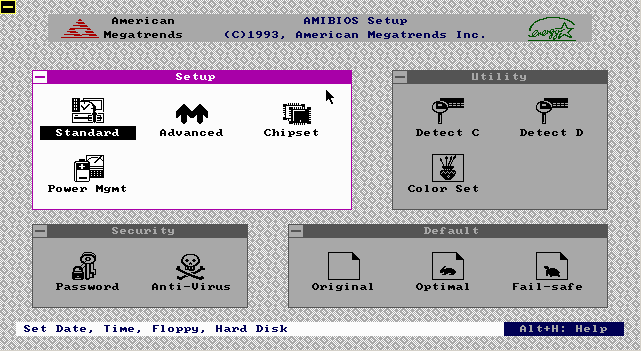
There was also AMI WinBIOS that provided a GUI, but I remember it being much less featureful than other BIOSes of the time with a TUI and didn't like mobos that used it, so in that case they may have sacrificed functionality for appearance.
I miss Openboot firmware that was on SunOS servers and workstations. It was IIRC mostly written in FORTH and we could write forth snippets at the serial console to make mods / query the pre boot environment. I also found the SGI boot firmware similarly functional. Both allowed changing boot settings and allowed to boot from network without any trouble at all. Graphical BIOS that came with the x86 systems was such a downgrade for us especially since you could not interact over serial/remotely with a simple terminal connection. IMHO
Is there also a term for when you present mangagers or clients with an array of options and intentionally degrade the ones that in your opinion would come out worse? Asking as a graphic who would never ask someone to pick the best of three pitches while alreading harboring a strong preference.
Plenty of 486 era machines had the AMI ”WinBIOS” whose setup utility kinda-sorta emulated a Win 3.x look and ran in (EGA 640x350 4bpp?) graphics mode, with mouse support:


https://upload.wikimedia.org/wikipedia/commons/0/05/Award_BI...
https://liveusb.files.wordpress.com/2010/05/awardbios-firstb...
And the simplified crap with tabs that often came with prebuilt PCs but later seems to have spread to others too:
https://cdn.staticneo.com/a/Intel_Sandy_Bridge_Z68_P67/S%20B...