As a Rust user, very happy with qmetaobject-rs. It was really a breeze to make a basic GUI for personal use ...
I would also add an opinion: Qt is a great fit for Rust. GUI toolkits (=presentation layer) is best done declaratively and QML does an amazing job at it. Keep in mind that making a GUI kit, specially for 5 platforms in a way that it runs and feels uniformly across them all is a herculean task that returns no benefits because even if I can write some GUI in a "rusty" way, it won't suddenly speed up things because GUI is almost never a bottleneck.
I've always tried to build GUIs declaratively, but always failed to see the advantages over a traditional imperative building blocks. It's all good if we want to display a static dialog box, which is always the same, but complications arise when we want to do some nonstandard stuff. And this "nonstandard" is defined differently depending on the framework, but for some frameworks this status is achieved pretty easily.
With declarative + nonstandard we end up with some declarations, which are not the GUI we expect it to be, plus imperative code that mutates this anyway. So it's like we don't have the advantages of declarations, and we still need to write the code to build the GUI.
I'm still waiting for nice Qt bindings for Rust, as qmetaobject-rs seems to be QML-only?
I think I get what you mean. In my experience, declarative frameworks are great for simple UIs but don’t scale all that well with UI complexity. Eventually you find yourself doing somersaults and handstands to achieve what you need with them and find yourself wanting to fall back to a boring old imperative framework.
Granted, my experience is with SwiftUI and Jetpack Compose, not QML but it doesn’t seem like developing complex (especially full fat desktop-style) apps with declarative frameworks is as nice as it could be.
SwiftUI is still relatively young and... idiosyncratic. I hate how hard or weird it makes some basic things. (empty, transparent element with an action attached just to handle an event of the window appearing?)
But there are some really good systems available. .NET WPF is great overall for example. I could of course complain about how things are implemented and how mvvm is not baked in and how converters are too big and many other details. But I never needed to hack around the declarative part - that always just worked.
I was convinced that XAML was the perfect answer for rust and had the idea that I could write an independent XAML library/engine that rust appdevs would use and then match to a backend that would codegen the XAML into code that utilizes its corresponding api.
I had a sample that worked with both imgui and one of the other rust gui engines (not immediate mode) to prove it could be done. Biggest benefit was abstraction from actual ui toolkit choice (inspired by Windows where you can use a subset of the same XAML with WPF, Avalonia, WinUI 3, UWP, Noesis, Uno) and being able to take an imperative ui library like ImGUI and use it in a declarative fashion. Moreover, you could reuse existing XAML designers or avail yourself of XAML export functionality in some design software, without having any of that be rust-specific.
I put out feelers in the community to gauge interest but I think XAML is too foreign to most FOSS devs that picked up Rust early on and people couldn’t see what I saw in it (having worked with XAML for over a decade in C# land).
I tried for a year to learn XAML (mostly using Avalonia) and it just never clicked for me. Feels like it needs too much secret insider knowledge that you're only going to get with that decade of C#. To much is implicit and magical, and it was very, very hard to trace through what was happening when something behaves unexpectedly.
I got to the point where I could build a basic app with it fine, and I might pick it up again if I find the right project, but it just never seemed like it was adding anything, just making simple things more convoluted to me. I also found the C# community to be pretty hostile and insular, not in an intentional way, just more of a "hey we really want to help but everyone is too dumb and lazy to learn these hundreds of 'basic' things", and there's no good places to learn outside of noisy discords, SEO Spam q&a sites, and weird and vaguely hostile chatrooms.
I haven't used XAML even once, but I've tried to use FXML (JavaFX), but generally it felt too superfluous and inconsistent. But I'm not sure how XAML and FXML are related (if at all), also I'm not sure if XAML is even used outside C# and Windows?
I haven’t used JavaFx so I can’t answer that part of your question but XAML has been cross platform with Xamarin on macOS and Android and now everywhere with MAUI. I also mentioned Uno which lets you develop for web/electron with XAML.
Language wise, it has been largely C# or other .NET like VB.NET, F#, or managed C++ though I think Noesis lets you use it from C++ and other languages directly.
C# itself is completely uncoupled from Windows ever since .NET Core and now with later .NET versions like .NET 8 all Windows-specific bits have been torn out altogether. Microsoft probably uses C# on Linux more than they do on Windows these days.
I've got a potential example; I always wondered how that would be achieved with something like slint or qml:
With tools like xournal++ or other things like document processors, you can usually define your own panels, reorganize them, move them around, add icons or separators, etc, and all of that in a drag&drop fashion, live from the program running.
I feel like having a (compile-time) declarative description of that wouldn't cut it, or be very abstract, with most of the logic outside of the declarative description.
Another option might be something that's "runtime declarative", and drag&dropping icons and panels around just change the ui definition?
Yes, panels are one example. Which panel goes to which window corner? What is the resize policy? It will probably be read from the file according to user preference, so it can't be hardcoded declaratively in QML.
What is the current theme? Window position? Maximized/minimized state? Those need to be read from preferences and applied at runtime.
I can declare a listview. What are the columns? Those are probably read from preferences. Along with their order and sorting preference. So I can't declare that in QML, I need to dynamically create the GUI in window creation code.
GUI style: basic/advanced. I might be able to get away with different QML files for that, although I need to figure out which QML file to use in runtime (because I need to read it from prefs), so I can't hardcode it.
Maybe the main window can have a splitter in the middle. In this case the left and right widget needs to be saved/restored somehow, and the splitter position needs to be persisted. Maybe we support tabs in the main window, and those tabs could be dragged outside of our window into a separate standalone window. We need to serialize the state of the window manager, and deserialize it later, so user preference would be preserved. Is the scrollbar standard or custom? Because we might be doing a text editor and we maybe want to support visualizing buffer map inside the scrollbar. This widget is probably fully owner-drawn anyway, so can't be declared in the QML.
I guess nowadays most of those topics are not even considered because there is no such thing as user preference for GUI. User takes what the javascript developer gives, nothing more, nothing less.
I feel like half the things you describe as needing to do at runtime are ok to exist in the declarative QML, but as a property with a signal. Position? Property. Basic/advanced view? Property. Splitter config? Property. Etc.
Leaving some things as parameters that can be adjusted in the model doesn't make the GUI not declarative. Preferences are just fine in a declarative world. Some things are harder than others, so list views that handle very generic data may need to be built manually, but those are exceptions.
Qt has had panels and splitters that you can move around at runtime since forever. There's a function to call to save the state and restore it when loading. What's the problem?
I have tried it, and I feel like this is not a good toolkit for desktop apps. It's great for embedded hardware with custom interfaces such as vending machines, car on-board PCs, screens in public transport, but it does not have that native look-n-feel on desktop, at least not out of the box.
The only issue with declarative is when declarative is a prison instead of a fantastic and reasonable guideline. One of the very nice things about react is that you can escape pure declarative syntax to use actual javascript/typescript. Every declarative DSL/language/format that I've used has approximations like QML's [`Repeater`](https://doc.qt.io/qt-6/qml-qtquick-repeater.html), but eventually you will want and need some weird loop or logic that is most easily and succinctly expressed in a proper programming language -- at that point, you'll need to do some angry hack that unrolls one data structure into another so that you can iterate over that one with the limited logic in the declarative format. And then you'll have to keep the two models in sync.
Sorry, no experience there but it's possible that just for big screens, GTK might beat Qt ... (I think KDE also supports the "legacy" Qt + Rust option in some way ...)
But my point was mainly about the (almost) impossibility of building a well functioning cross platform UI kit. I honestly believe that effort should not be spent in that direction when a reasonably open source and well functioning option already exists.
I find QML satisfactory for big screens. Made an app back in Qt5 and my main dev machine was a 4K, 43 inch LCD TV -- it did fine on the big screen. No limitations in that regard that I could see.
You could - if you have several hundred full time developers working on it for years. This probably means you pay them, but the count of full time developers is the important part.
Details are hard. The core might be doable in a basic form by one person, but there is a lot more than the core that needs to be done. All those little details add up - they are only a small improvement, but all those small improvements adds to polish.
Yeah but Qt does a lot more, to match Qt you would need a similar effort. I remember some time ago was a popular article shared here on how hard it is to render text when you need to consider all the languages and all the font types and all the options. So it wold be easy to paint some shapes and some english text in the happy case and it would probably be enough for video games but then you need Widgets that will work with different user preferences, different languages, different color schemes, different DPIs, different platform conventions. Then you want to access the clipboard, the App settings folder, the notification system, maybe embed a webview to show soem html content ... Qt does a lot of things if your job is to make a professional complex Desktop application starting from basic building blocks and wasting your time on the Widgets and platform stuff then on business logic is not a good investment. If you are a hobist and writing Rust makes you super happy then I invite yout o continue.
The point is if you start with a good foundational layer, then a community can build greater things on top of it.
Of course, it will take time and if you're looking for a great library that can do everything out of the box, now, then you should pick Qt, there's no doubt about that.
Communities forming around a project is one of those things people think happens a lot but doesn't.
Even with effort, meaningful communities are the exception (let's say 1 in 1000 projects) rather than the rule.
There is also a significant random luck/etc aspect that people like to pretend doesn't exist (ie people like to pretend that if you do all the right things you will just end up magically with a community around your project 100% of the time)
>Because it will be written in pure Rust (with all the memory-safety advantages that come with it).
I do not think that Rust enthusiasts will waste their free time reimplementing complex, boring stuff in Rust, only if they are paid, otherwise they will work on a new Rust game engine, or TODO app, or AI, WASM or something cool. Something as big and as high quality as Qt can't be implemented by 3 guys in weekends, maybe if they get Patreon support os they can work full time they can get the easy part done.
I do not think Qt suffers from memory issues so nobody would pay to rewrite it, but maybe we will have some super simple GUI framework you could use for GUI in video games or some simple English only , zero customization , simple apps.
You need a big community that can build a Qt alternative, we have Linux as an example of a community project but the reality is there was a lot of money behind it, so you need a Rust community with a lot of money behind it so developers will be paid to work on the non-cool stuff.
the good foundation layer needs to be designed correctly. Otherwise you have SVGs and English, but you have to tear the whole thing up when someone asks for translations. Then someone asked for the next feature and you have to tear it all up again. This is a hard problem.
If that's your reason for using Rust then safety is as useful in a GUI toolkit as anywhere else (indeed I'd say more so - GUI toolkits tend to involve lots of hierarchies and callbacks that make it easy to get confused about ownership, or get into unexpected states).
In my last role we were using QML as a prototyping tool for interfaces, and basically making whole proof-of-concept apps in it. It is immensely powerful once you get the hang of it. Though if anyone is thinking about it, please note that it is not (or wasn't) really a language on its own. It's meant as a UI complement for Qt, and trying to build stuff exclusively in QML is a recipe for tears.
The imperative parts of QML is javascript. So lack of type safety in larger apps can start getting really annoying, especially once the code base starts to age and not all corners of the code base gets tested every day.
Other than that, beginners to the codebase tend to break property bindings without realizing. There are a few tools to catch this at runtime, but would be nice to do this at compile time.
Also not all of the "Desktop widgets" were readily available in QML in Qt 5 (not sure what the status in Qt 6), and you tend to roll your own Table Views etc.. and those ones need even more work to work like native widgets, supporting keyboard navigation etc...
Overall Qt5/QML was fun to work with, but I did miss a few bits that were readily available on QWidgets.
Not OP, but QML is not a great language to put more logic than simple bindings and functions like
    Button {
        text: "Save"
        enabled: textField.text.length > 0 // this is reactive to the value of a TextField
        onClicked: Backend.save()
    }
as soon as you try to for example implement the save method in JS/QML this starts to become very painful as it often ends up with a lot of spaghetti code. The very cool thing with QML is that the save function can be simply implemented in C++ like this.
It was basically this - and to be clear this is not a shortcoming of QML. As you said, splitting the logic layer from the UI is a good idea - but the choice for us to be building apps in QML without a logic layer under it required a lot of weird solutions that could've been easily addressed if we'd been doing C++ and Qt. But our team were Javascript developers, the team we were partnering with were Qt devs, and someone had negotiated this solution and we did the work.
It is also possible to have a backend implemented in JS in similar way. Though I personally only have used in intial UI prototype which I latter swapped with Julia backend.
I have developed/prototyped a voting client with QML/Julia in PeaceFounderClient [1]. Few weeks ago I made bundling setup for it and have published bundles [2]. This may not scale well but I opted for bridging the backend with frontend in top scope with Bridge.qml [3] which on the Julia side is loaded with ‘loadqml’ using ‘QML.jl’ pacakge [4].
I'm favorably disposed to QML, but for it to actually replace Qt Widgets it'd have to provide: better out of the box desktop integration, a public C++ API and a better WYSIWYG UI designer.
I've created a desktop app using QML (the model is written in C++) that looks pretty good in my opinion[1]. I second the out of the box desktop integration, Qt Quick components should look and behave more like native ones. Although they're very easy to customize so it's not too big of a problem. But definitely something to consider if Qt wants better adoption.
There still isn't even a native way to make text nodes in a custom widget. It's been 14 years.
I tried to write a basic serial console app using QtQuick some years ago but the functionality was just too anaemic. I don't really understand how you can write a serious GUI app with QtQuick/QML. If it's just very basic controls, sure. As soon as you need something slightly complicated it totally falls down in ways that QtWidgets don't.
Also the scoping rules of QML make no sense. Children can refer to parents which totally breaks encapsulation.
Qt Design Studio is buggy and heavyweight. It lacks integration with Visual Studio, has a bad integration with Qt Creator. It doesn't produce clean .qml files. Qt Designer (the one used for Qt Widgets) is better in those regards.
Anyhow, this might be a controversial opinion, but the best experience I've had with WYSIWYG UI designers was with Netbeans Swing Editor and VS Windows Forms Editor. The IDE integration was seamless.
Can it even do basic forms by dragging and dropping of components?
I recently tried and failed. It was either doing absolute positioning or failing completely - for example dropping components onto grid would just place them into cell 0,0. There was no way to design form with mouse.
I used a lot of different UI designers in the past and all of them were heaps and bounds better.
As sibling points out NetBeans Swing designer (with Matisse/GroupLayout) is the best, along with VS WinForms (although these tend to be non-scalabale)
If you create a sample project with a list view, you can scroll that widget by clicking the mouse on the background and dragging it (a reminiscence from touch based interfaces). The example projects don't look native but look like a mobile app inside your desktop. Windows themed button sizes don't follow Windows 7 desktop guidelines out of the box.
Sure that if you put the extra effort you can make QML look native, but it makes you wonder if desktop is in fact a goal for the framework.
I just wanna say I've been a fan of Qt and its contribution to native UI, KDE is awesome and all. I just wish there were good qml supporting easy to use libraries in modern languages that wrapped it because I can't do C++ unless someome is paying me good money and full time for it. Not fun for side projects.
I'm a C programmer with occasional stints in C++, a language that I admittedly have a complicate relation ship with. Personally, I was quite pleased with Qt 5 & Qml when I got to work with it some time back.
I'm mentioning this here because, as already noted in my previous post, HN threads on Qt have this bizarre tendency to attract some really weird FUD/shit-flinging.
Qt is nothing like Electron. It is nowhere near that, or "underperfoming" in comparsion. In my previous post, I even specifically mentioned how the projection I was on was replacing a Chromium + REST backed based stack on an embedded device with Qt, because that was a slow resource hog in comparison. Somehow I have my doubts that comments like that come from actual experience.
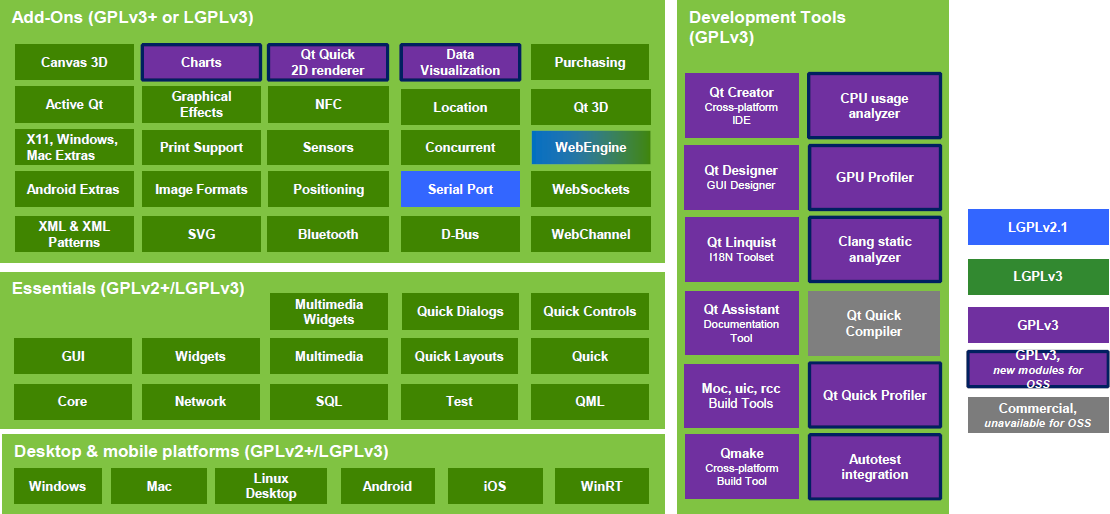
What is the licensing story for Qt these days, my understanding is some portions are only available under commercial license or the GPL (vs. others also under the LGPL)?
That's the QtQuick 2D renderer. They mostly use that on devices without a decent 3D GPU.
That was also Qt 5.7. With Qt 6, QtQuick itself is part of QtGui now. It is available under LGPLv3 and additionally under GPLv2, GPLv3, Qt for Device Creation Professional (Pro) and Qt for Device Creation Enterprise (Enterprise).
But the embedded companies I've worked with tend to avoid LGPLv3 because of the anti tivoisation clause. (To let the end users swap out the Qt libraries on your devices).
Everything you need for a traditional desktop app, or hell, a complete desktop environment, is LGPL. GPL parts are more specialty and industry tools (IoT protocols, etc)
The only thing about QML that I like that QWidgets does not have is the anchor-based layout system where you can anchor widgets relative to the edges of other widgets. Other than that QML seems more like a solution for embedded interfaces (car media centers, dashboards, kiosks, etc) where you roll your own look, rather than desktop applications.
I think QML was originally designed as "mobile first", but I think it works fine for desktop interfaces as well. I wrote an app that ran on Android as well as Windows and I liked it just fine for that task.
What's the QML story when using pyside6/pyqt? I know it's possible to use both but I was wondering if it's worth it, and how painful it is to add to an existing app?
If your existing app is a pure CLI app, you just expose your Qt objects to qml and it should be fairly smooth sailing.
If your existing app is a QWidgets app, then not sure how much benefit you'd have when mixing QML/QtQuick with your QWidgets side of things. We did implement such a thing at a little project before... where the "canvas of items" was written in QML and the remainder of the UI was QWidgets. For our usecase, it was good.
Awesome that's exactly what I was wondering. Yeah, my app is mostly qwidgets with the layout in code. It's pretty painful to do the layout so QML does look tempting. At least it's probably better than doing it with qtdesigner!
Ah. Anchor based layouts are nice and work well until they don't. Especially when dealing with multiple resolutions, different sized content/padding etc.. They did work really well in simpler projects of mine though.
For doing serious UX work, having direct manipulation of the GUI is paramount. Modeling human cognition without actually seeing the design while designing is makes hard to actually do the core of the work. Qt creator/designer for Qt desktop/widgets shines here.
Designing UIs in text is where most frameworks fail. It seems really bizarre that more techie devs still seem to believe they can design good UI blindfolded.
Imho, C++ not is a language using which user facing software should be built anymore, but Qt at least makes the compromise bearable, making memory management less of a burden.
The problem with Flutter and Dart is that it changes so often; a 1-year old codebase is probably always non-compilable on a newer Flutter version. Even the language evolves quickly; I did some app on Flutter one day, only to discover two years later that the language itself evolved to support nullable types, and the official way of migration was to "just create a new project from scratch and copy your files to this new project, fixing compilation errors", because the amount of small items to tweak was too high.
Another problem with Flutter is that the build system is arcane, nobody understands it, save for framework authors. It's being marketed as "you don't need to understand it, just push this button", until something breaks, and something always breaks from time to time.
One could argue that it's good that the ecosystem evolves to a better version; but the problem is that often this "better" is different for different people. If we're aligned in the same set of definitions then maybe it's a positive thing, but when the definitions diverge, a problem starts to be visible.
So I wouldn't say that using Qt/C++ is harder than Flutter/Dart. Maybe for one-off easy apps that are forgotten about a few months after creation. But for long-term programming and maintenance, Qt/C++ beats Flutter every day of the week.
The traditional widget-based Qt up to 4.x was a pretty good application development framework (not just a UI framework). From that point of view, both "modern" Qt and HTML are overkill.
No, just the other way around in fact. Qt applications don't come with a starting requirement of ~300MB just for the mandatory webbrowser - before adding any of your own code.
Funny because I think HTML is overkill and QT is good enough. HTML meaning that your app runs in a browser, which generally uses much more resources than a QT app.
HTML was designed for documents, which it does adequately. But for an actual UI, you need to be able to position things easily. HTML/CSS just has all these gotchas all over the place because the defaults are just unsuitable for UI. If you work hard enough you can something working, but QLayouts are so much easier. Then after that you have to work in a language that makes every error a runtime error and doesn't even distinguish between between float and int. Which you can work around by adding another layer, namely TypeScript. All these layers just add the complexity. Qt Widgets is one of the best-designed UI APIs.
I've kind of given up on Qt, though:
- they seem to want to go in the QML direction, and if I wanted to use JS I wouldn't be using a C++ library
- their interpretation of LGPL has historically required making the entire Qt library downloadable from your website, which is inconvenient. (This may have changed with Qt 6?)
- it never looks or works quite right on macOS. In particular, text in comboboxes is just not centered vertically correctly, and it drives me nuts.
Tailwindcss makes using CSS easier, it’s still CSS underneath, which you can interface with directly if you want.
For medium to large applications it takes quite a bit of work to give your Qt GUI a custom style, and do it right. This isn’t something you can hand wave away.
> Another thing you can immediately see is that the QML version of the algorithm is generally much slower than the JavaScript version. As noted above, this is due to it being built on QObjects rather than JavaScript objects.
Of course, QML is trying to beat the browser at it's own game, but can't match the billions invested in browser performance.
Qt classic is dead, and QML is a less featured, less documented, underperforming copy of Electron.
Qt/qml is not an ideal, of course. There are many controversial things. But it outperform all of the alternatives in terms of portability, built-in features and performance in complex.
Qt Widgets is not dead, its feature complete and in many industries that's a very valuable. New projects in Qt widgets are being done all the time in the embedded space.
QML is not trying to beat the browser at its own game. It is not made to display, you know, websites (and web apps), with a stack that was originally created for documents, and that still shows. QML is not JavaScript, it's a neat UI description language that uses JS for dynamic aspects.
It's not less featured, it's differently featured: it has features that have been directly designed to create user interfaces. Unlike HTML and CSS!
The documentation is very good, actually. Of course, if you are already familiar with the web stack, it may seem obscure to you.
Sorry, but this is FUD. Qt is miles ahead of Electron in terms of performance, app startup, native platform support, and low memory consumption, to name a few.
Additionally, its documentation is one of the best in the market.
+1 on the documentation. As someone whose job involves a daily use of Qt, I think I've been spoiled by the documentation. Qt does a tremendous job of explaining nearly every function and property in detail, as well as giving a healthy class-level overview (often with code snippets and even screenshots where it might be useful). In fact, even their (many) example programs each have their own documentation page explaining what the example code ia doing.
Short answer: yes. Tauri is using your OS own web view instead of shipping y’know… entire Chrome. And for native stuff, it’s generally faster and smaller with Rust than… checks notes… the entire Node runtime.
In short, it’s not super hard to beat electron especially in terms of disk/memory.
Now, that said. Many of you think you suffer because web=slow, JavaScript=bad yadda yadda. But this is often not true at all, which almost always turns up in apples-to-apples benchmarks. In fact, the suffering is almost always because of lazy/hypey/bloated stacks full of ads/multiple cloud backends for metrics, ads, logging, etc etc/poor coding standars etc etc. So the long answer is that Tauri won’t help with those deeper issues.



I would also add an opinion: Qt is a great fit for Rust. GUI toolkits (=presentation layer) is best done declaratively and QML does an amazing job at it. Keep in mind that making a GUI kit, specially for 5 platforms in a way that it runs and feels uniformly across them all is a herculean task that returns no benefits because even if I can write some GUI in a "rusty" way, it won't suddenly speed up things because GUI is almost never a bottleneck.