I don't use IPv6 because it solves a problem that I don't have and it provides functionality that I don't want. And also because I don't understand it very well.
My points :
- I don't have a shortage of IPv4. Maybe my ISP or my VPN host do, I don't know. I have a roomy 10.0.0.0/8 to work with.
- Every host routable from anywhere on the Internet? No thanks. Maybe I've been irreparably corrupted by being behind NAT for too long but I like the idea of a gateway between my well kept garden and the jungle and my network topology being hidden.
- Stateless auto configuration. What ? No, no, I want my ducks neatly in a row, not wandering about. Again maybe my brain is rotten from years of DHCP usage but yes, I want stateful configuration and I want all devices on my network to automatically use my internal DNS server thank you very much.
- It's hard to remember IPv6 addresses. The prospect of reconfiguring all my router and firewall rules looks rather painful.
- My ISP gives me a /64, what am I supposed to do with that anyways?
- What happens if my ISP decides to change my prefix ? How do my routing rules need to change? I have no idea.
> - I don't have a shortage of IPv4. Maybe my ISP or my VPN host do, I don't know. I have a roomy 10.0.0.0/8 to work with.
What happens when multiple devices in your /8 want to listen on port 80 and 443 on the public address? Only one of them can. Now you're running a proxy.
> - Every host routable from anywhere on the Internet? No thanks. Maybe I've been irreparably corrupted by being behind NAT for too long but I like the idea of a gateway between my well kept garden and the jungle and my network topology being hidden.
It's called a firewall. You want a firewall. IPv6 also has a firewall. NAT is not a firewall. NAT is usually configured as part of your firewall, but is not a firewall.
> - Stateless auto configuration. What ? No, no, I want my ducks neatly in a row, not wandering about. Again maybe my brain is rotten from years of DHCP usage but yes, I want stateful configuration and I want all devices on my network to automatically use my internal DNS server thank you very much.
DHCPv6
> - My ISP gives me a /64, what am I supposed to do with that anyways?
What are you supposed to do with a /8? Do you have several million computers?
> - What happens if my ISP decides to change my prefix ? How do my routing rules need to change? I have no idea.
What happens if your ISP changes your IPv4 address?
Wow. It's like your reply is doing an impression of IPv6! (I'm just teasing. I hope you are having a happy new year.)
Not GP, but:
> What happens when multiple devices in your /8 want to listen on port 80 and 443 on the public address? Only one of them can. Now you're running a proxy.
I don't want any of my devices listening on the public address, much less multiple.
> It's called a firewall. You want a firewall. IPv6 also has a firewall. NAT is not a firewall. NAT is usually configured as part of your firewall, but is not a firewall.
That's a non sequitur. I can have a both a firewall and a NAT. The two layers are better than one because at least my address is shouldn't be routable even if I failed to configure my firewall correctly.
> DHCPv6
Okay? DHCPv4
> What are you supposed to do with a /8? Do you have several million computers?
That's GP's point. Running out of address space is not a problem even on IPv4 with NAT.
> What happens if your ISP changes your IPv4 address?
Well, an ostensible advantage of IPv6 is publicly routable addresses. I know how to configure my internal IPv4 network with host table entries and so on. If I move to IPv6 then my "internal" network address space is at the whim of my ISP.
Been having a nice break over the new year, thank you :)
I can't argue with sticking on IPv4 when you have no need for IPv6. However, people saying no NAT means no firewall really bothers me because it's just wrong and usually gets thrown around as part of a point around "who needs IPv6 anyway".
The two layers IMO don't make a practical difference. A deny by default firewall will fail closed, unless poorly configured. A poorly configured firewall for IPv4 with NAT can still leave machines exposed. This is not an IPv4/IPv6 problem this is down to your router. However you do expose what used to be private addresses with IPv6, but there's not much to do with the address that couldn't be done with your IPv4 address assuming sane firewalls that both stacks run.
On the other side of the coin IPv6 being ubiquitous would make my life much easier. I self host a few things across a few different machines. IPv6 offers me a much simpler solution, both to managing firewalls and not needing to fight over port 80/443, but also because I can't get a public IPv4 address from my ISP without spending ungodly amounts of money. They support IPv6 but many of the services I host don't support it. I have to use a second site + machine, wireguard tunnels, and nginx socket proxies to expose stuff publicly (this is cheaper than the public IPv4 address from my ISP).
My point about DHCPv6 is to say that if you want to use DHCP in IPv6 you can. It's right there, it's just not the default.
IPv6 doesn't make things substantially harder, just different. But people don't want to learn new things because, to be fair, they don't need them. But people who do need IPv6 are stuck behind garbage ISPs and this "not my problem" attitude throwing around ignorant arguments. Complaints about long addresses really get me too :), use a DNS.
>IPv6 doesn't make things substantially harder, just different. But people don't want to learn new things
I learn new things all the time. IPv6 is much more complicated, and importantly, more complicated than it needs to be. There is really no reason for most devices to be publicly reachable. Everyone keeps holding this up as a positive, but it's absolutely not. Most devices aren't servers. Yes, a firewall can prevent these connections, but the whole standard is built around this use case most people don't need most of the time.
Private IP space is incredibly useful. I build it and set it up -- my ISP does not have control. This is _gone_ with IPv6 and it makes things much more complicated than they need to.
> There is really no reason for most devices to be publicly reachable. Everyone keeps holding this up as a positive, but it's absolutely not. Most devices aren't servers.
Ever tried to call someone over the internet? Well, now you need a publicly reachable device.
Please, stop spreading this ignorance. You rely on your devices being reachable from the internet every single day, you're just not aware of it, because you're using a barely-working pile of duct tape and string that sort-of allows peer to peer connections to happen, after some arcane STUN/TURN/whatever magic.
If you wanted to send someone a file in the Olden Days, you'd just click on their IRC username, the client would open a connection to them and you'd send the file. Now you need to use iCloud or some nonsense, because apparently people believe that peer-to-peer connections aren't needed and shouldn't even work.
I’m wondering, wouldn’t a default deny inbound firewall still need hole punching with IPv6? You wouldn’t need STUN to find your global address but if you use varying ports you’d need to communicate the port first, and you’d also need to time the simultaneous open. So a coordinating party is still needed somewhere. Getting rid of TURN relays (if you’re affected by symmetric NATs) is of course a huge plus.
No, you'd have something like UPnP open a port on the firewall, I imagine. It depends on the setup, which can now be much more flexible, since the firewall can run on the machine itself. You also have the benefit that multiple machines can listen on the same port, so you don't need a proxy any more.
>Ever tried to call someone over the internet? Well, now you need a publicly reachable device.
Uhh... Is this the '90s? People don't type in IP addresses (or phone numbers, back in the day) to connect with other people anymore. They connect to a common, publicly reachable server that deals with peers being behind NAT.
Most video calling software uses STUN NAT hole punching and not central relay servers. You are definitely publicly routed when you call through Google Meet or WhatsApp or FaceTime
It doesn't really matter. Any communications provider must keep call records for the FSB, so routing them through central servers and recording there is the only option anyway.
Of course it matters. STUN isn't theoretical, it's in actual, practical use across a great many things. There's plenty of things that aren't "calls" in a telecommunications sense. Discord, Telegram, Zoom, Slack, Jitsi, and far more. And there are plenty of other things entirely that use the same tactics to get direct peer-to-peer connections.
That is a quite extreme outlier, then. Hardly relevant to the global IPv6 and peer-to-peer conversation we're having here, and your objection still only applies to one narrow use of the technology under discussion.
>That is a quite extreme outlier, then. Hardly relevant to the global IPv6 and peer-to-peer conversation we're having here
It's China with it's 1bn of internet users and 2bn+ devices .
If you're happy to exclude half of the internet from your "global peer-to-peer conversation", then you don't need ipv6 either, just use the Chinese IPs for your own purposes, there are plenty of them.
Actually this is the attitude I am seeing from the ipv6 zealots all the time: blatant disregard of reality. Nobody wielding and non-negligible amount of power wants peer-to-peer communication. Companies don't want it, governments don't want it, large masses of people who want a person with a vested interest to be responsible for the link quality don't want it.
What ipv6 zealots don't realize is that ipv6 will not bring them their coveted p2p, because, guess what, incoming connections are to peasant computers are blocked by ISPs by default.
As I said, p2p benefits even you right now, today, on IPv4, despite your unwillingness to acknowledge it. I've never even owned an IPv6 address in my life, so this mental image you've painted of myself and of our interaction is quite inaccurate.
You've taken this conversation quite far off its rails. This started due to your objection about phone calls not benefiting from P2P connections, which as I said are one narrow use of the overall technology. P2P connections are still useful. Nobody's blocking China. China connects peers, too.
I'd also like you to clarify something for me, earlier you mentioned P2P doesn't work, specifically for calls, specifically for your country, because all calls need to be transported through the FSB. This isn't any sort of accusation, I fully believe you are in China, but I'm curious what the FSB has to do with you in that case?
You don’t need to allow peer-to-peer connections with IPv6. They’re easier to allow and book keep - but also easier to block. The workarounds for peer-to-peer with IPv4 NAT are extremely difficult to detect and stop (STUN, various proxying setups, etc.). A lot of software does it though, for performance reasons. CGNAT is quite expensive and error prone, and causes a lot of support calls too.
Every ISP router I’ve gotten (US, India, Brazil, Germany) in the last few years had IPv6 AND default block for inbound connections in the stateful firewall. Which is fast, cheap, and easy. And most of my traffic (~90%) ended up being over IPv6 by default in a dual stack environment, with certainly no apparent latency penalty. In most situations, a latency decrease near as I can tell, as I didn’t need to route through someone else’s random servers at first to initiate connections for certain kinds of traffic. And no, I wasn’t torrenting.
The hilarious thing here is what is even the fight about?
There are too many humans on this planet for even one IPv4 address per, and too much traffic/connections to sanely coalesce every thing under CGNAT - and why go through all the trouble, when IPv6 is simpler and faster at an infrastructure level anyway than multiple layers of CGNAT and dealing with all the crazy BS that comes up when you have that much address translation and packet rewriting going on.
Which, notably, is more expensive than the more straightforward stateful firewall stuff anyway.
No one is intentionally going to IPv4 unless they have no choice due to backwards compatibility, and that is an increasingly shrinking pie. In another 5-10 years as the old consumer gear finally EOLs, it’s probably going to only be used for niche backwards compatibility (like RJ11 and the old school telephone system), and corporate use where their EOL timelines look more like 50 years. But pipe over tunnels over IPv6.
Which works great BTW - 90% of my active IPv4 usage is for internal servers using Tailscale, which is all actually transported over IPv6. And it does that because while it can use CGNAT punching tricks with TUN/S, etc. it’s faster to just connect directly (through the firewall rule I explicitly created to allow this).
And that is just because the Tailscale software prefers to display/default copy-paste it’s internal IPv4 addresses over internal IPv6 addresses for some reason, which I’m sure will change at some point.
It doesn't really matter where I live. In any case, "worksforme" ia not a solution.
We are discussing a supposedly global standard, which should work and be better for everyone, including Russia, China, Iran, everyone.
You know, Western politicians usually have exactly the same desires as their authoritarian Eastern counterparts, they are just unable to express them publicly. But hey, ipv6 is a niche problem discussed only by geeks, they don't actually have to say anything publicly about it, they can just silently sabotage its implementation.
China obviously has a state security service, but it doesn't really matter, I used FSB as a generic term for a law enforcement agency which tells ISPs what to do.
Nobody said "worksforme." It is a global standard, that does work for everyone, just not for every single use case like with telecoms and FSBalikes. It being a sidegrade in some areas does not negate the overall improvement.
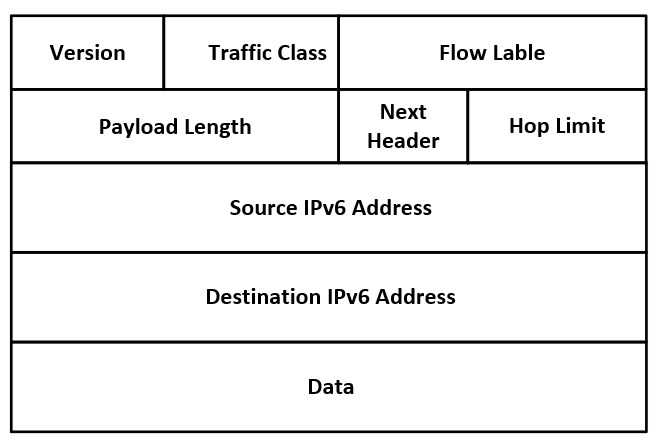
Notice how the IPv6 header is simpler? That’s because it is. It has normal working semantics, got rid of fragmentation, TTL is replaced by hop limit, and link-local addresses actually work as intended. The addresses look scary != more complicated. Please stop perpetuating this myth.
That is literally all it is. There is nothing else to it. You get P2P connections and a longer address. The rest is what they removed from the protocol, not what was added.
SLAAC is a huge and complex part of IPv6. Higher reliance on ICMPv6 is also a big part of it. Networking stacks for IPv6 are also more complex, especially if you want to support SLAAC, requiring things like multiple IPs on every machine by default, and so on. The very fact that you have to choose between static IP, SLAAC, and DHCPv6 is another complication - if the choice is even there, as some major devices don't support DHCPv6 (Android).
SLAAC is stupid simple. The router just sends out its address, the netmask and optionally DNS servers. You can configure each host on your network to use the MAC address based suffix, a privacy one (random and changes several times an hour), or a static suffix. This is way simpler than DHCP which is stateful and requires multiple back and forths with the DHCP server.
And yes each host/interface can have more than one address which is amazing compared to having to create virtual interfaces for IPv4. You can literally just add more addresses.
Oh and when working with Docker or other container systems you can just use a link-local subnet instead of setting up a virtual network which makes things so much easier and nicer. There it really is zero configuration, not even firewall rules. It takes less effort to do this than to use IPv4.
> Private IP space is incredibly useful. I build it and set it up -- my ISP does not have control. This is _gone_ with IPv6 and it makes things much more complicated than they need to.
Not in the least; IPv6 has private address space just like IPv4.
> the whole standard is built around this use case most people don't need most of the time.
This seems to be a function of when it was developed, starting in the early 90s before the internet as we know it today, particularly the web, even existed. Security wasn’t seen the same way then, because the threats we have today simply didn’t exist.
Not every company in the world had its own private networks, so there weren’t even good examples to follow. The result was a system designed in the effective equivalent of a vacuum, without regard for how the internet would actually end up being used. The result is the situation you described.
Incorrect. There is the ULA range, fc00::/7, which is not routable and can be used in the same place you'd use 192.168.0.0/16 or similar.
You can even do something like fc00::192:168:0:0/120 if you really want.
> There is really no reason for most devices to be publicly reachable.
If you want things to work in one direction only, you really want television or radio. This is how most people really treat the Internet, unfortunately.
> I learn new things all the time. IPv6 is much more complicated, and importantly, more complicated than it needs to be. There is really no reason for most devices to be publicly reachable.
Sigh. This myth really won't die.
Publicly addressable ≠ publicly reachable.
With my last ISP I had IPv6: every device (including my printer) on my local network had a public IPv6 address, but exactly zero were reachable thanks to the stateful packet inspection (SPI) on my Asus.
You’re either arguing about semantics or missed the point they were trying to make. If it doesn’t have to be publicly reachable, why should it be publicly addressable in the first place? I can’t think of any common requirement that will be afforded to users having devices that will never need to be publicly reachable be publicly addressable. Considering most peoples use cases solely involve home networks of devices that they definitely do not want to be publicly reachable, why is needing to explicitly disallow that better for them?
In non-abstract terms, I just don’t see how that works better.
> I can’t think of any common requirement that will be afforded to users having devices that will never need to be publicly reachable be publicly addressable.
Because you do not know ahead of time which devices may have such a need, and by allowing for the possibility you open up more flexibility.
> [Residential customers] don't care about engineering, but they sure do create support tickets about broken P2P applications, such as Xbox/PS gaming applications, broken VoIP in gaming lobbies, failure of SIP client to punch through etc. All these problems don't exist on native routed (and static) IPv6.
> In order for P2P to work as close as possible to routed IPv6 in NATted IPv4, we had to deploy a bunch of workarounds such as EIM-NAT to allow TCP/UDP P2P punching to work both ways, we had to allow hairpinning on the CGNAT device to allow intra-CGNAT traffic to work between to CGNAT clients, as TURN can only detect the public-facing IP:Port, hairpinning allow 100.64.0.0/10 clients to talk to each other over the CGNATted public IP:Port.
By having (a) a public address, and (b) a CPE that supports PCP/IGD hole punching, you eliminate a whole swath of infrastructure (ICE/TURN/etc) and kludges.
When it was first released, Skype was peer-to-peer, but because of NAT "super nodes" had to be invented in their architecture so that the clients/peers could have someone to 'bounce' off of to connect. But because of the prevalence of NAT, central servers are now the norm.
A lot of folks on HN complain about centralization and concentration on the Internet, but how can it be otherwise when folks push back against technologies that would allow more peer-to-peer architectures?
> by allowing for the possibility you open up more flexibility.
The problem is that flexibility is often the enemy of security, and that’s certainly true here. Corporate networks don’t want to allow even the possibility of devices that are supposed to be private being publicly addressable. Arguing that it’s “simpler” or “more flexible” is like arguing that we don’t need firewalls, for the same reasons. And in fact, that argument used to be made quite regularly. It’s just that no-one who deals with security has ever taken it seriously.
What do you mean by popular? I hosted a site on a home machine in the early teens. If you don't know how to do that with NAT, you should not have a web server under your control exposed to the internet.
The early teens didn’t have huge proliferation of ISPs using CGNATs.
These days ISP can’t get hold of new IPv4 blocks, and increasingly don’t provide public IP addresses to residential routers, not without having to pay extra for that lowly single IPv4 address.
Hosting a website behind a NAT isn’t as trivial as it used to be, and for many it’s now impossible without IPv6.
> Hosting a website behind a NAT isn’t as trivial as it used to be, and for many it’s now impossible without IPv6.
The example I keep coming back to is multiplayer games like Mario Kart, where Nintendo tell you to put the Switch in the DMZ or forward a huge range of ports (1024-65535!) to it [1].
If you’ve got more than one Switch in the household, though, then I guess it sucks to be you.
To require that, the person would have needed to disable upnp on their router. I’ve played tons of multiplayer games on the switch and upnp handled it seamlessly on the 7 or 8 home networks I connected it to over its life. Never once even had to think about it.
So yes, if you disable the requisite, standard, built-in feature on your router, you may need a pretty annoying workaround. Weird!
What percentage of users do you imagine disable upnp? Let’s be real. This is a problem that your average user will never, ever experience a problem with.
No they wouldn't. UPnP is not requisite, certainly not standard, or necessarily built-in. For example, the router I've got doesn't implement UPnP.
It's not unusual for it to be disabled, because it's a security issue that something with no authentication can punch enduring holes out through NAT.
It's also irrelevant in a scenario where the ISP's using CGNAT.
I'm sure the Switch deals with conflict resolution with multiple consoles on the same network too but shrug it's another example of how NAT is a pain and also contradicts your assertion that incoming connections would be a breach of ISP ToS [1].
Edit: A quick Google suggests the Switch originally didn't support UPnP, and the Switch 2 now supports IPv6.
Ok, so it didn’t even need upnp then. Are you talking about using their LAN head-to-head feature across the internet? Or perhaps all the times I used my switch on various networks to play head-to-head games it was… my imagination? Sure. If people had to consistently forward every port on their home router to play Fortnite, smash, etc. with a portable console you’d never hear the end of it. This is literally the first time I encountered someone saying this was a problem. Regardless, most people don’t buy routers— they use the ones their ISPs gave them, and I haven’t seen one of those come without upnp in at least a decade. You’re seeking out reasons to dislike NAT.
Capitalism, essentially. Companies can make more money from centralized control over systems than from truly distributed systems, and customers are suckers for the simplicity of delegating their needs to single providers.
The reason Google bought and destroyed dejanews.com, for example (try visiting that site) was to weaken one of the distributed sources of competition. Similar for RSS.
I'd like to know the average number of broadband customers that make support tickets because of NAT. I'll bet it's far less than 1%. And you really think NAT, rather than SV betting huge on cloud services and surveillance capitalism, was the reason that everything is centralized? Come on...
I already addressed this, and I know how firewalls work. It would be nice if on a per-device basis I could opt into a choice to be publicly addressable. Instead, the entire standard is built around this.
You literally can. You can just use local link addresses, IPv6 routers are guarantee not to forward those packets out of the network, or forward traffic into the network addresses to one of those IPs. Devices within the network can all still talk to each other.
If you really want to do the full Monty, add a NAT to your IPv6 router to have it translate to the local-link addresses, just like it would on IPv4.
I would highlight this is also identical to IPv4, which notably is also a standard built around the idea that every device in the world can, and should, be given a publicly addressable IP. Many large corporations and universities with /8 IP blocks do exactly this. Unfortunately when they originally wrote the IPv4 standard they slightly underestimated how many devices would eventually connect to the internet.
If you disable the firewall with a “master disable” I suspect IPv6 routes through on at least some routers. Meanwhile if the NAT is disabled, it almost surely takes the route with it, and even if it somehow routes thorugh you probably won’t get a DHCP lease from your ISP for more than a device or two.
> you do expose what used to be private addresses with IPv6
its been 10 years since i first rolled my eyes at ipv6 due to this problem. youre saying its still a problem, over a decade later? ugh. bring on ipv7 or ipv8.
Not really, privacy extensions are usually on by default, at least on Windows and Linux. This means temporary ipv6 addresses will be used for outbound traffic and rotated regularly (usually every 24h by default, if I'm not mistaken). And if you're worried about tracking, we have lost this war ages ago, ipv6 wouldn't meaningfully change that.
> its been 10 years since i first rolled my eyes at ipv6 due to this problem.
You might find this comment [0] informative.
You might also be interested to know that the ULA space was defined and reserved in October, 2005. If you of ten years ago had done a little more research, you'd have discovered that the problem had been solved ~ten years prior.
A NAT is part of a firewall, not a separate thing, so if the firewall is misconfigued, then your NAT may not be working either.
On not running out of (private) IPs, I guess you've never had the fun of having to deal with overlapping ranges (because it isn't the number of IPs that's the issue, it's how the ranges are allocated). While this can still happen on IPv6, there are so many more subnets that this is far less likely.
Also, a key thing that IPv6 makes obvious (which is also true to some extent of IPv4, but that most systems try to avoid showing) is that each link can have multiple IPs (there will be at least one link-local address), and so while your ISP can provide you a public range, you don't need to use it if you do not want to, you can always use an Unique Local Address (ULA - https://en.wikipedia.org/wiki/Unique_local_address), which reduce the chance of overlapping ranges.
Why do you think NAT is part of a firewall? NAT and firewall are two completely separate things that can exist independently of each other.
Also overlapping ranges are an orthogonal issue that can occur with IPv6 private network range as well.
IPv6 brings not only bigger address range but also a big bag of other things that one cannot ignore, are complicated and which are often a source of problems. That's why people stick with IPv4 even at the cost of NAT, because the number of things they have to care about is much smaller.
> NAT and firewall are two completely separate things that can exist independently of each other.
This is kind of like saying that web browsers don't have to have a graphical interface. Or that a web browser doesn't necessarily support HTTPS. It's correct, but not practically correct.
The reality is that essentially all NAT software you'll actually encounter will be integrated into a stateful firewall because the two systems share so many functions that most projects and products that do one will also do the other. If you have a system with NAT set up and there is no packet filtering, it's most often because you've intentionally gone and disabled all the packet filtering, not because you need separate software for it.
It is important to understand that NAT doesn't have any inherent security to it, but criticizing people for talking like NAT is a feature built into firewalls when NAT is overwhelmingly a feature built into firewalls is a pretty unfair reading when we're talking about general deployments. Even with the technical audience of HN, we're not discussing carrier grade NAT here or other highly specialized or exceptional deployments.
SNAT absolutely has intrinsic features that are utilized for security purposes.
This isn't to disagree with your main point. Many people in this topic have an oddly narrow definition "firewall" that tends to fall along the lines of "whatever makes me right and you wrong".
A statefull SNAT implementation itself has most of the characteristics of a "firewall".
> SNAT absolutely has intrinsic features that are utilized for security purposes.
Yes, but those features aren't there because they're security features. They're incidental to how NAT functions. It's not inherently secure. The intention of the design is to permit hosts on a network that is not Internet-routable to be able to send traffic that is Internet-routable. That's not a security feature. That's allowing traffic to pass that would ordinarily get black-holed.
> A statefull SNAT implementation itself has most of the characteristics of a "firewall".
Sure, but you should recognize that that's the same as saying a stateful SNAT implementation is an incomplete stateful firewall.
If your goal is to use private addresses, you should use NAT. The point is that if your goal is security, then you should configure a firewall.
Don't expect software that isn't designed to provide you security to provide you with any security.
SNAT is often a feature built on a network stack that also provides other "firewall" functionalities like filtering packets. Configuring SNAT is configuring a firewall? Or is only dropping packets a firewall? Or does the device need "firewall" printed on it? Does a device that has "firewall" printed on it still count as a firewall if it's not configured to filter packets? What type of filtering makes it a firewall? If an SNAT implementation drops packets is it a firewall? Is a linux/windows/bsd box with multiple interfaces a firewall? What if I slap "firewall" label on the box; a firewall now?
SNAT can be used to mask source IP and that can absolutely be utilized strategically as a layer of "security".
If your ISP delivered you a packet with a destination address of 192.168.0.5, there's a good chance your router would deliver it to that device without consulting the port forwarding table. In this way, NAT isn't a firewall and you're relying on your ISP's routing policy as your actual firewall.
If my ISP sent me a billion dollars I would be a billionaire.
What's represents a "good chance" the router is so grossly misconfigured as to allow inbound traffic no destined for the IP assigned to the WAN interface to be routed to one of the internal interfaces? I wouldn't be surprised, but what's a "good chance"? Is there data on this?
A typical, correctly configured SNAT implementation would most likely have the characteristics commonly attributed to a "firewall". An incorrectly configured network device may not have the characteristics commonly attributed to a "firewall", regardless of its ability to actually inspect and drop packets(which just about every commonly used OS network stack can do out of the box).
But even an SNAT implementation without typical "firewall" characteristics has intrinsic characteristics related to security; such as source IP masking. Which doesn't even need to be private.
> when NAT is overwhelmingly a feature built into firewalls
This is just not correct. NAT and firewall are simply orthogonal concepts and can and often are deployed separately. A simple example is your average small SOHO router, which usually has NAT but quite a lot of them lack a firewall.
> if the firewall is misconfigued, then your NAT may not be working either.
But in that case, it's very obvious because your access to the WAN side of your router won't work from anywhere except the router itself.
I like this "fail-secure" nature of NAT. If your firewall fails on a network with globally-routable IPv6 addresses, it might not be so obvious as traffic might still flow through.
It provides no security by itself. There have been (and still are) countless vulnerable Internet reachable NAT routers which can easily be exploited to provide access to the whole private network behind it. NAT by itself can't be relied on to provide any security – you need correctly configured firewalls for that. An ISP provider might provide a sensibly configured firewall with the home router, but they may also be operating an easily exploitable backdoor into your private network.
Practically speaking, even without any firewall, NAT provides some level of security. If I can't route to your network, I can't access it. Yes, theoretically someone may establish a route to an RFC-1918 address block across the Internet or within your ISP, but doing so without ISP cooperation is unlikely. To say it is "easily" exploitable is an over-exaggeration.
>If I move to IPv6 then my "internal" network address space is at the whim of my ISP.
This is a major problem to me before I'd go wholesale IPv6 at home as the primary way I address and connect to hosts
I have IPv6 enabled, but it's just all defaults. My traffic is going out over the internet on IPv6, my home automation stuff in the house using Matter is on IPv6, but for the few server-types that I have in the house they are still identifiable by me by their IPv4, and my addressing to get into my network from outside is via my ISP's IPv4 address
There really needs to be a universal way to bring IPv6 addresses to your ISP, so they're portable like a phone number. Both so that I can take them with me if I switch providers and so that my ISP can't arbitrarily change them from underneath me
With IPv6, it's common to have multiple addresses on an interface.
So on options is to assign yourself an [RFC 4193](https://datatracker.ietf.org/doc/html/rfc4193) fc00::/7 random prefix that you use for local routing that is stable, while the ISP prefix can be used for global routing.
Then you don't need to renumber your local network regardless of what your ISP does.
That's why I mentioned multiple addresses. The public addresses (assigned using SLAAC or DHCPv6) are for global reachability, while you use the local prefix for stable addresses within your network.
If you want stable global addresses, you should request an AS number and prefix, and choose a provider that allows you to announce it with BGP.
> There really needs to be a universal way to bring IPv6 addresses to your ISP...
There is. It's "Provider-Independent" address space.
It's used sparingly because widespread use of it would explode the size of routing tables.
I think you could also "simply" [0] become your own AS/LIR/whatever and negotiate with your ISP to route your prefix/subnet/whatever to your site (or some box in a colo somewhere that you attach to your site with some sort of tunnel).
[0] It is my understanding that it is often not at all simple to do this.
Why? You could easily block their range and it'd be blocked no matter where they went
IPv6 is already a nightmare for dealing with scammers and spammers. It's very often I get weirdly blocked because someone has abused my ISP's (AT&T) IPv6 block that I'm on and Wikipedia or whoever has blocked an entire /48 or something and it's virtually impossible to get a delegation outside of that range
> That's a non sequitur. I can have a both a firewall and a NAT. The two layers are better than one because at least my address is shouldn't be routable even if I failed to configure my firewall correctly.
You have two layers of indirection and one layer of security. If you failed to configure your firewall correctly, you would be better off without NAT because you would become aware of it quicker and not rely on NAT.
NAT doesn't really do anything other than address conservation because of NAT-punching techniques like STUN/TURN/UPnP, which are nessisary because NAT's features are bugs.
> I can have a both a firewall and a NAT. The two layers are better than one because at least my address is shouldn't be routable even if I failed to configure my firewall correctly.
That's not true. When you configure just NAT (with e.g. nftables on Linux), the NATed devices are still reachable from the outside, you just have to add an entry to your routing table to reach that internal address space using the router.
"Just add an entry to your routing table" ... it's virtually impossible to do that for RFC-1918 addresses across the internet. It will be filtered at the ISP border or an upstream. Is it theoretically possible? Yes. Is it an actual risk? Probably not.
> Well, an ostensible advantage of IPv6 is publicly routable addresses. I know how to configure my internal IPv4 network with host table entries and so on. If I move to IPv6 then my "internal" network address space is at the whim of my ISP.
This is not quite correct. You have two simple options for avoiding this: DNS and SLAAC. By giving all of your hosts dns names you don’t have to care about the individual addresses much. If they change just update the dns zone.
The second is to configure a Unique Local Address for each host using SLAAC. Have your router announce a prefix inside of fd00::/7 so that every one of your computers ends up with a private address as well as the public one. This is like using a reserved private address in IPv4, such as 10.0.0.0/8, except that there are a lot more possible networks. There is only one 10.0.0.0/8, but the convention with IPv6 ULAs is to generate 40 random bits and use them to make a /40. Add 16 more bits for a subnet id to create a /64 that your router will advertise as a prefix. This is probably overkill for most of us, but it does enable us to merge networks without causing address collisions. You can keep using them no matter what happens. Even changing ISP won't change these addresses.
Of course the third option is to buy IP transit service instead of internet access service. You can then go to your local RIR and ask them to assign you your own address block. Announcing that address block using BGP gives you a permanent block of routable addresses that follows you from ISP to ISP. But most people find that to be a bit of a hassle compared to consumer–grade internet service.
>Of course the third option is to buy IP transit service instead of internet access service. You can then go to your local RIR and ask them to assign you your own address block.
Or I could just log into my router and disable IPv6
> By giving all of your hosts dns names you don’t have to care about the individual addresses much. If they change just update the dns zone
"just" update the zone? Yikes. I prefer to not take that downtime in the first place. (And I know from experience, I've written hooks for dhcpcd that automatically reconfigure my zone file, firewall rules, rad.conf, etc, if I get a new network prefix! But I don't pretend that this is a workable approach for everyone.)
> The second is to configure a Unique Local Address for each host using SLAAC
Yes, this is the way. Where you used to use RFC1918 addresses, just use ULA. It's simple and fits the mental model you used to have with IPv4. You don't even need NAT, just give both the GUA and ULA addresses to each host, and use the ULA everywhere you want LAN-like semantics.
Yes, I know that there are other private subnets in IPv4. My comparison was specifically between IPv6 ULAs and 10.0.0.0/8 specifically because of the size. You won’t have to renumber your networks when you grow in size because 2⁷² addresses is enough for just about any organization.
> Can BGP really handle every person in the world doing this?
Eh, probably not. I did say that it wasn’t for everyone. You have to fill out a form, and then they announce to the world that you did it. And if you configure your BGP announcements wrong you’ll get laughed at by everyone who watches those things. Most people can’t handle it.
On the other hand, the VP of Network Operations at the ISP I used once promised that they’ll honor BGP announcements even from residential customers. I guess once it’s automated that it doesn’t cost them anything extra. Could be a fun hobby.
And if enough people do it then we can simply improve BGP. Anything we invent we can improve, right?
> That's a non sequitur. I can have a both a firewall and a NAT. The two layers are better than one because at least my address is shouldn't be routable even if I failed to configure my firewall correctly.
You talk about NAT like it's a single thing: it is not. There are at least three major varieties of NAT:
The RFC for NAT was extremely specific: this was only about creating more addresses, NOT security.
Because your devices are routable. You can’t be on the Internet without an IP. They just have some ephemeral addresses. But randomizing port numbers (that is NAT) is not a good security mechanism.
>I don't want any of my devices listening on the public address, much less multiple.
That is good for you, but given the option between an address scheme that requires a proxy and one that does not, I would prefer the latter.
>I can have a both a firewall and a NAT. The two layers are better than one because at least my address is shouldn't be routable even if I failed to configure my firewall correctly.
Why? NAT is a network tool. Firewall is a security control.
>I don't want any of my devices listening on the public address, much less multiple.
If you don't listen to public ports on IPv4, then there is no point in touting any of the benefits of IPv4. Even if you think NAT is good, you're not using it in the first place so why care about it?
You basically ruined your entire case with that sentence.
Great response. Your last point is particularly convincing and I never thought of it before. Even better, what happens if you use a failover WAN on your router?
> It's called a firewall. You want a firewall. IPv6 also has a firewall. NAT is not a firewall. NAT is usually configured as part of your firewall, but is not a firewall.
Expanding on this. NAT as deployed in most soho/residential settings requires a stateful firewall to track connections + port mapping logic.A stateful firewall is also used for IPv6 edge security and using the same basic posture (out allow, in established/related only) except the only difference is it isn't also doing an address mapping. Nobody is out there saying folks should run a wide open IPv6 edge, and as far as I'm aware no one is shipping IPv6 ready consumer routers that do that (but I'm prepared to be proven wrong in the responses).
"What happens when multiple devices in your /8 want to listen on port 80 and 443 on the public address?"
This is a feature not a flaw. The average person doesn't have anything acting as a server, and that's a good thing, because the only servers they'd have would be embedded garbage in poorly maintained or completely abandoned IOT devices with incompetent code that should not be publicly exposed, ever, in anything but a call out model.
Firewall is a feature. Forced NAT that noone in the above described situation wants is just a flaw. And the other solution where you're forced to buy a fucking "public" number out of a grossly insufficient pool of those for $5/month for each of the NATted machines and your router, is a crime against humanity.
I'm naive with network security, so this is a honest question looking for a practical honest answer: Would my grandma's computer, with its old version of windows, be more or less safe with a NAT without DMZ configured?
Using a normal ISP issued router, wouldn’t make a lick of difference if it was IPv4 with a NAT or IPv6 without a NAT. They’re all configured out-of-the-box with a default deny firewall. I’m not actually aware of any residential grade router that doesn’t come configured like this.
Of course if the router is misconfigured, then all bets are off. But that’s true regardless of IPv4 vs IPv6, because people will just compromise your router first and use that as a launch pad for the rest of your network. Just like to do today with plenty of old residential routers.
You're not wrong, yet there's still no compelling reason to make an extra effort to switch to ipv6 when the limitations of ipv4 don't personally affect you.
> What happens when multiple devices in your /8 want to listen on port 80 and 443 on the public address? Only one of them can. Now you're running a proxy.
I want to be running a proxy in that scenario, because I don't want any of it accidentally exposed.
> It's called a firewall. You want a firewall. IPv6 also has a firewall. NAT is not a firewall. NAT is usually configured as part of your firewall, but is not a firewall.
Yes, but it's arguably helpful to have configuration mistakes still leave your internal network unexposed. It's harder to accidentally expose resources when your ISP won't route to them.
> > - My ISP gives me a /64, what am I supposed to do with that anyways?
> What are you supposed to do with a /8? Do you have several million computers?
Except you can subnet an IPv4 /8. You can't subnet an IPv6 /64. For whatever stupid reason, and despite having 18 quintillion available addresses in a /64, you can't actually do anything useful with it other than yeet a bunch of devices on the same LAN segment.
(At least on pfSense, and when I looked into it some, that's apparently IPv6 design for some reason)
> The only thing significant about /64 is that’s the smallest unit for SLAAC.
...which means you can't subnet it because you have to assume SLAAC might happen since that's the only thing ipv6 requires. Ergo, an ISP only giving you a /64 means you have to nat if you want subnets, and if you have to nat why wouldn't you use ipv4 instead where it's so much simpler?
I haven't looked at pfsense UI, but you can happily hand out a prefix to a device, which can then hand out its own prefixes. I do it with my k8s clusters, which means the node themseves have enough IPs addresses to launch their own routable k8s clusters.
Thats why its recommended that ISPs give /56 by default (and up to /48 if requested). This way you can do plenty of effortless subnetting. If your ISP is only giving you /64 even after you requested a larger subnet he is doing IPv6 WRONG.
They said that you can't subnet a /64, not that you can't subnet in IPv6. And while technically you can subnet even a /64, it's not supported by SLAAC, which means that, for example, you can't get an Android phone to work with auto-assigned addresses in a /80 IPv6 network.
No, my connections time out for a brief period of seconds or minutes and then everything is fine for the next two years (until my ISP cycles my IP out again) and I don't actually need to do anything to resolve this. I wouldn't even know when my IPv4 address changed because the impact is so minor. uPnP may be on by default but that doesn't mean most people are actually using it for anything.
That is what link local addresses are for - which you can access your devices on just fine, and don't change. And bonus points - aren't externally routable either.
One really nice thing about IPv6 is you can (and do) have many addresses, all of which work.
for example, you can add a manual fe80::5 address to one machine, and fe80::9 on another - and use those to access those machines on the local network. And not have to worry about that being externally addressable, or having conflicts, etc.
And they won't change when your external addresses change either (unless there is some weird software bug in your OS or something).
> > - My ISP gives me a /64, what am I supposed to do with that anyways?
> What are you supposed to do with a /8? Do you have several million computers?
The /8 was for private addresses, so "free" and uncontested, while the /64 is a public resource. Looking at it as extraneous or over provided is understandable IMHO, even if mathematically it's not supposed to get depleted.
The IPv4 10.0.0.0/8 (along with the other private ranges) runs into lots of problems when connecting two private networks (e.g. VPNs, VMs/docker, hotspotting), whereas that /64 will not conflict with anyone.
I "solved" this by running a separate VLAN for work machines that provides addresses in a slightly weird /24 carved out of the 172.16.0.0/12 [0] range. Is it as collision-resistant as a ULA address? No. But -sadly- I've yet to see an Enterprise VPN that wasn't run as an IPv4-only thing, so it's the best I can do.
[0] Or whatever the netmask actually is. I'm never sure about the 172.16.x.x space.
I'd be tempted to shove that VPN into a network namespace together with jool, and NAT64 their 10.x subnets into, let's say, 2001:db8:a:b::/96, so that their 10.1.2.3 becomes 2001:db8:a:b::10.1.2.3. Then there's no overlap as viewed from outside the namespace.
And if you ever need to use another VPN that also clashes on 10.x, you can do the same thing but map that one into 2001:db8:a:c::/96. Then you've got 2001:db8:a:b::10.1.2.3 and 2001:db8:a:c::10.1.2.3, neither of which clash with either each other or your 10.1.2.3.
The vast majority of people are not VPNing into networks they don't know and accidentally having arcane IPv4 collisions. This is not a real problem that needs to be solved.
TLS SNI routing has fixed the multiple authorities listening on one IPv4 address port 443.
Most ISP’s implement IPv6 by using the single IPv4 address as a v6 prefix. This results in the entire LAN needing to change local addresses every time the public IP changes. In practice this means a single brief power outage causes hundreds of devices to break instead of none.
Generally speaking ipv6 is useless for most home network users.
Overlapping 10/8 with corporate networks is not a problem, wireguard has solved this in all cases I’ve run into.
> It's called a firewall. You want a firewall. IPv6 also has a firewall. NAT is not a firewall.
With NAT, I absolutely know my ESP32 is not vulnerable and exposed on the wild wild web. With a firewall, I may have a configuration issue or there might be a bug in the implementation or there might be some UDP nuisance I didn't know about or a dozen other concerns. I don't want to hire a network admin not play one at home.
Your router will open up any port for an ephemeral forwarding if the traffic looks like that forwarding is warranted. Any application can open arbitrary inbound pathways. "Application" also includes the Javascript you run in your Browser. Which is externally controlled.
Security folks call those techniques "hole punching" but they are how NAT is expected to work.
Correct me if I'm wrong, but UPnP requires my ESP32 to initiate communication. Whereas giving it an IPv6 address would expose it to the entire www even before it attempts communication.
> Correct me if I'm wrong, but UPnP requires my ESP32 to initiate communication.
Not quite. Using UPnP, any host on your internal network can open a port for any other host. You may be thinking of NAT-PMP.
Additionally, by default UPnP mappings don't expire (unlike NAT-PMP mappings), so if a host crashes with an open port and your ESP32 inherits its IPv4 address, it will be exposed to the Internet.
NAT is way harder to screw up than a firewall, especially in cases where the defaults were left untouched. Also what the other commenter said about your internal addresses being at the mercy of the ISP.
> > - What happens if my ISP decides to change my prefix ? How do my routing rules need to change? I have no idea.
>
> What happens if your ISP changes your IPv4 address?
To my internal net: nothing. All my internal addresses stay the same. All my firewall settings remain the same. Just to the outside world I come from elsewhere (which is good for my privacy, not sufficient obviously, though)
However if my IPv6 prefix changes all my IP based access control, which is a layer I use to limit what Internet of Shit devices can do, breaks. I could go to fe80 addresses for my local network, but those won't work across different network segments.
You should use unique local addresses (ULAs, fc00::/7) not link-local addresses (fe80::/10) for this. Choose a random prefix and advertise it in your network (you can use some website like https://www.unique-local-ipv6.com if you want).
This prevents clashing subnets when using VPN like it sometimes happens with IPv4.
> - I don't have a shortage of IPv4. Maybe my ISP or my VPN host do, I don't know. I have a roomy 10.0.0.0/8 to work with.
That's great until you need to connect to a work/client VPN that decided to also use 10.0.0.0/8.
> - Every host routable from anywhere on the Internet? No thanks. Maybe I've been irreparably corrupted by being behind NAT for too long but I like the idea of a gateway between my well kept garden and the jungle and my network topology being hidden.
Even on IPv4, having normal addresses for all your computers makes life so much nicer. Perhaps-trivial example, but one that matters to me: if two people live in one house and a third person lives in a different house, can they all play a network game together? IPv4 sucks at this.
Landed on 172.16/22 for this reason however it's not uncommon how an enterprise to use all 3 private classes. One place I worked used 192.168 for management, 10 for servers, and 172 for wifi
Using 2 different classes has been a pretty common setup for wifi and wireless in my experience
> - My ISP gives me a /64, what am I supposed to do with that anyways?
For me, it is main problem. /64 is too small: SLAAC needs /64 per collision domain, and I have more than one (wired network, my WiFi, guest WiFi, control plane for UniFI APs), and it is painful to distribute /64 among them. I'm using HE tunnel which provides /48 to client and it is easy to configure, as intended.
There is recommendation (SHOULD, not MUST in RFC lingo) for ISPs to provide at least /56 to clients, but most domestic ISPs ignore this recommendation.
> - What happens if my ISP decides to change my prefix ?
And it is another problem: tooling. There is no standard way to reconfigure router with dynamic prefix(es). Yes, it is possible to write scripts for it, but it will be fragile. No Linux distribution or FreeBSD is ready to have dynamically allocated prefixes. It is not a real problem with IPv4 because real life practice to dynamically allocate one address and then configuration changes are trivial, and if you are delegated /24, it is typically static delegation.
That's a gripe I have with IPv6. There are too damn many special networks and addresses!
With IPv4 I can easily remember 10.0.0.0/8 and 192.168.0.0/16, but I can't remember the other one off the top of my head. (172.16.0.0/12 I think?). Multicast is 224.x.x.x/x IIRC, but definitely need to look that one up when I need it.
IPv6 has SO many special networks. Network. Public. Multicast. Link local. (Which isn't like an IPv4 link local, but apparently it can actually be on the LAN? IDK - I was just learning about it earlier today.) And every interface seems to have about 5 different addresses of each type.
Amusingly, there a lot more special IPv4 networks that you just don't know about too. e.g. Link local IPv4 is 169.254.0.0/16. It just isn't auto-configured on every IPv4 interface by default, like fe80::/10 is on IPv6 interfaces, and the TCP/IP stacks on most platforms do not enforce the link-local properties of it in IPv4 like they do in IPv6.
It's like the difference between HTML and a strictly typed language. Permissiveness and flexibility is both a blessing and a curse. As with a lot of things, which thing it is in any given situation depends greatly on the situation.
For almost all cases, there is absolutely zero need to ever remember addresses, or dealing with them directly. Give your devices proper names, and your router’s DNS will handle resolution automatically.
There is no point in your network having sequential addresses, so you don’t need DHCP; routers advertise configuration, clients know where to look for it.
IPv6 is amazing, if you let it handle connectivity without trying to micromanage it.
I think this is the big hangup. Wanting to micromanage each and every address. Instead of letting it just manage itself. Reminds me on some level of the pet vs cattle of containers and servers. Mental switch is needed. And many are resistant towards this.
One thing I've noticed is if people have spent a long time learning something they are incredibly reluctant to switch to something that no longer requires that knowledge. It's like driving an automatic car when you've already learnt to drive manual. I see this pattern everywhere and people are definitely reluctant to give up their hard-earned v4 knowledge.
Sounds like me. My concern,
if one just forgets everything, how does one know if their router, firewall, etc are too permissive? Security is still my responsibility.
And one still needs to pay attention for ipv4, so what is the benefit? A simultaneous half-vigilant, half-careless stance is not workable.
Hostnames are either in a static hosts file, which you need to distribute to your machines somehow (probably using older names or raw addresses, which you do not know, because need the names in the first place), or a DNS, and for most people the DNS is under ISP's control.
Even if you have your own DNS server out there somewhere, you still need to allow a bit of DNS hijacking from your ISP in order to receive that verification SMS and enter the code into the ISP's log-in page.
DNS is a great thing, but just too much of a pain to configure.
IPv6 is (IMHO) simpler: 2001::/32 and anything else (either link-local (fe80), multicast (ff00), and ULA (fc)). So either it starts with a "2" or an "f".
Yes on the same computer. Pretty much every multicast-capable host has a unicast address and has multicast groups that they join when they get an IP address. [0] Edge routers almost always have -at minimum- a global address and a "site-local" address. Any host that has multiple active interfaces can have multiple "categories" of addresses assigned to it.
You might also be unaware of the fact that network interfaces can usually be assigned multiple IPv4 addresses, just like they can be assigned multiple IPv6 addresses.
> ...the application does not have to figure out which one it has to use.
You might be surprised to learn that that's the job of the routing table on the system. Applications can influence the choices made by the system by binding to a specific source address, but the default behavior used by nearly everything is to let the system handle all that for you.
[0] You appear to be unaware that multicast addresses aren't assigned to a host. I suspect you're unaware that IPv6 removed the special-case "broadcast" address. It's now treated as what it actually is; the "all hosts" multicast address.
ipv6 just gives you two configurations to maintain, two firewalls to write rules for and cross-leaks that are hard to understand.
I make my internal network ipv4 only, I have a lovable static config, one firewall to maintain. I also use vlans to separate into "can get out", "can only get out through a whitelist proxy", and "can't get out ever". and I am very happy.
I just don't understand how people can just plug every device they own into a promiscuous ipv4 and ipv6 router and contribute to profiling, television snooping, vacuum cleaner house mapping, data leaks, botnets and more...
I do the opposite. IPv6-only in my LAN and Kubernetes Cluster and NAT46/NAT64 for external ipv4-only egress/ingress. Makes it much easier than both dualstack or IPv4 alone.
> - I don't have a shortage of IPv4. Maybe my ISP or my VPN host do, I don't know. I have a roomy 10.0.0.0/8 to work with.
10/8 is great until two organizations with 10.0.0.0/24 in their OSPF or IS-IS topologies are brought together via a merger/acquisition. Then you can end up with NAT with-in an organization itself. (Internal split-horizon DNS here we come.)
> NAT per se does not prevent an outside host from connecting to a host on your local network.
Yep, and a firewall per se does not prevent an outside host from connecting to a host on your local network. You can bang your head all day long, the side effect of NAT is to only allow incoming traffic that refers to an established connection that was initiated from the local network. How is this different from a firewall that does
No, the side effect of NAT is that outbound connections made from your network look like they come from the router's WAN IP. It doesn't filter incoming traffic.
If it did then you might have a point, but since it doesn't it's very different from a firewall that's configured to do that.
And again, yes, by the original definition of NAT in RFC1631, you are technically correct, which as we all know is the best kind of correctness and will move things forward. However, here in the real world, practically all NAT implementations are stateful and ignore (effectively: drop) incoming packets for which no corresponding connection can be found, meaning they do "NAT filtering" as "defined" (it's not really defined there) by RFC4787. When we say "this box here is doing NAT" everyone expects this behavior. To call this "NAT and firewall" is pointless semantics, and even the people writing RFCs agree here, which is quite something. You will see that RFC4787 says "This section describes various filtering behaviors observed in NATs", and they also say that NATs provide "firewall behaviors" without calling it "a firewall".
Well, no. They do ignore them, but that's not effectively a drop. It's an ignore. It just means that they don't edit the packet. Whether it gets dropped or not depends completely on the routing and firewalling parts of the router.
People do generally expect a NATing router to firewall inbound connections, but it's important to realize that you won't get that behavior from NAT. You must have a firewall, which is a separate thing.
I guess technically you are right, in that NAT doesn't prevent connections, it enables connections. But in the situation where you would have a NAT, behind a residential router, an outside host cannot connect to an arbitrary host on my internal network.
On a publicly routed PC, I can call `listen` and an outside host can connect to me.
On a PC behind a NAT - if I don't set up port forwarding - I can call `listen` and nobody from outside can connect to me.
So one could say, going from publicy routed to behind a NAT means that only allowed incoming connections are possible. Or am I missing something and you can really, from the outside, open a connection to a PC on a residential network which is behind a simple NAT (TCP server listening on that PC)?
The only caveat is that if you're using RFC1918, it greatly limits who can connect -- only your ISP, or another customer connected to the same shared VLAN your router is, or anyone that can physically attach to that network (or anybody in a position to order, blackmail or social engineer those three groups or their employees) can do it, because they're the only people that can set a route to your router for RFC1918 destinations.
Other than that, the connection will just head right on through your router. NAT's whole thing is to change the source address of your outbound connections. Inbound ones (when they don't match port forward rules) are ignored by it, which means they get routed by the router in exactly the same way they would if the router wasn't doing NAT.
At best you could argue that RFC1918 blocks connections, which would be somewhat closer to true, but... well, it doesn't. If you actually want to stop all connections from outside your network, you've always had to do it with a firewall on the router.
And of course, I said "if". You can NAT on public IP space. On residential connections you're unlikely to have public IP space on v4, but that's just a consequence of v4 being exhausted.
There have been incredibly clever attacks based on tricking intervening routers into routing the traffic to the target gateway, but more prosaicly my next hop ISP is itself a threat I worry about.
Every single time. But that actually gives a simple answer for why IPv6 is still not commonly used. People can’t wrap their heads around the (simple) fact that NAT is orthogonal to firewalls - and IPv6 has more difficult concepts to offer.
An ASN with a /32 allocation (the smallest for ISPs) is four billion /64s. It takes dozens of yottabytes of traffic to exhaustively scan one single /64. The entire v4 space takes 0.00000001 yottabytes, or about 110 GB/port in more understandable units.
There's a ton of things you can do to cut down on the scan space for v6, but it's still far huger than v4 can be.
>I don't use IPv6 because it solves a problem that I don't have
At least here in the U.S., my observation has been it's usually a bit faster and has more efficient routes than IPv4. I assume part of that is using newer equipment and architecture than practical for IPv4 and ability to have more granular routes.
I regularly see 1-2ms improvement to first hop outside my ISP network (10ms vs 12ms)
Remembering addresses is a solved problem with DNS.
Practically every single device or program that is connected in that ipv4 network will have a built in tunnel into the garden, with nat traversal being standard practice for everything. Your fridge, car, door lock, light fixture, all the applications on the phone, everything can and likely is a whole into the garden where someone can get full access. There are quite a few companies who has lost millions because they assumed that the garden was safe from threats within.
Never understood why they decided to include letters instead of keeping it numeric.
Hell, going from 199.120.121.122 to 199.120.121.122.123 will have expanded IPv4 by 254 times. It took us, what? 40 years to exhaust Ipv4... Just increasing it by 254 alone is insane large amount.
Belgium used this solution for their number plates They used to have a 6 letters/digit mix. Like abc-001 type of number plate. It started to run out, so they simply created a expansion, so new number plates started with 1-abc-001 in 2010, ... and in 2021 did 2-abc-def ( they did not run out of 1, they seem to simply use the first number to indicate the decade more and more). At that rate, Belgium will run out of numbers in they year 11990 ...
Ipv4 is easy to work with, easy to remember, write down, read ... Ipv6 is always a struggle. And yea, the idea that every device may need its own IP from your provider, is just insane.
I have so much more issues configuring things with IPv6, vs just basic IPv4+NATS. Its simply, its easy...
And maybe some people do not have this issue, but our provider gives DYNAMIC IPv6, so the pre-fix keeps altering! What makes configuring things on a NAS even more hell.
O and that :: range modifier is so fun. And the whole pre-fix and post-fix structure...
I hate it. Its complex for my little brain as i do not work daily with it, and whenever i need to deal with Ipv6, i need to relearn the quirks of it every time because of issues like the whole pre-fix/post-fix, dynamic pre-fix etc. Where as IPv4 ... so easy.
> Hell, going from 199.120.121.122 to 199.120.121.122.123 will have expanded IPv4 by 254 times. It took us, what? 40 years to exhaust Ipv4... Just increasing it by 254 alone is insane large amount.
In it's original design, SIPP, the design that was chosen for IPng had 'only' 64-bits, but it was decided that it would be impossible do another transition, and going to 128 would be better future-proofing:
So 199.120.121.122 could have grown to 199.120.121.122.152.183.166.197, which I do not think would have made a practical difference to those who complain about "hard to remember" addresses.
And it took 40 years to exhaust IPv4 because NAT was invented (RFC 1631), and now we're stuck with that kludge and have to have all sorts of workaround for it (ICE/TURN/STUN). IMHO it has also has contributed to the centralization of the Internet because doing P2P is just a pain in the ass.
The letters are hex digits, and make it more compact, regular. That’s the good part.
But I agree, using a reserved byte to select internet, say 0 for original, next two hundred for each region, with the rest for planets/moons/nearby stars, would have been easier to understand.
Disagree. We are trained on numbers from kindergarten. It's used everywhere (e.g. see a number, store it in short-term memory and input it into calculator). Hex digits are completely different and we don't have developer neural paths for that. They are also unpronounceable.
I have developed neural paths for them. 00 is black, 80, grey, FF white. They can always be two padded digits instead of one to three, therefore more regular and compact. Letters are pronounced just fine.
For example, I'd prefer c0a8.0001 to 192.168.0.1/16 notation. The limitation is that the netmask delimiter can only split by nibble.
> - I don't have a shortage of IPv4. Maybe my ISP or my VPN host do, I don't know. I have a roomy 10.0.0.0/8 to work with.
Remember, mate, with a /64 you can host your own ISP. You can finally have real Internet access! (Oh, wait -- it's not actually your /64 and your local ISP[s] wouldn't route it to you if it were, so you really can't.)
> - Every host routable from anywhere on the Internet? No thanks. Maybe I've been irreparably corrupted by being behind NAT for too long but I like the idea of a gateway between my well kept garden and the jungle and my network topology being hidden.
Oh, come on. Just look around. Almost everyone here agrees: NAT isn't a security function. Furthermore: NAT is literally the devil and has been for all of the decades you've been using it. Just think of all the stuff it breaks! Like FTP! (Remember how broken FTP was with NAT back in 1995? Or, *shudder*, h.323?)
Besides, with a /64, you can even have every computer on your network changing addresses for every IP connection! Doesn't that kind of obscurity sound nice? (Except... No, that doesn't sound nice at all. That just sounds bizarre and weird -- like dancing about architecture, or maybe some analogy about babies and bathwater.)
> - Stateless auto configuration. What ? No, no, I want my ducks neatly in a row, not wandering about. Again maybe my brain is rotten from years of DHCP usage but yes, I want stateful configuration and I want all devices on my network to automatically use my internal DNS server thank you very much.
Have you ever considered the concept of giving each machine two different IPv6 addresses? One for you to control, and one for your ISP to be in charge of. That'd be quite lovely, wouldn't it? (Except: Now you have two problems.)
> - It's hard to remember IPv6 addresses. The prospect of reconfiguring all my router and firewall rules looks rather painful.
Yeah, well. Uh. Have you tried looking into using ULA addresses like fe80::? (It's awesome! It's got all the hypothetical network convergence problems that an RFC 1918 10/8 has with which to bite you in the mysterious future, except it's also hexadecimal! And unlike the grossly prevalent DHCP system that your 10/8 LAN uses today, nobody can agree on how to centrally assign these addresses to devices!)
> - What happens if my ISP decides to change my prefix ? How do my routing rules need to change? I have no idea.
Look, man. Let me just move these goalposts for you. The real problem here is that people, like you, need to adopt IPv6. So adopt it already. Your router's implicitly always-on stateful firewall will just take care of it, just like it has almost certainly both incidentally and irrevocably done for your entire history of using NAT with IPv4. And the advantage to you is... you have that big, beautiful /64 to play with however you want (except: it isn't yours, so you don't), free of the chains of that ugly hack of NAT.
(See? That wasn't so hard! The goalposts are heavy, but they can still be moved easily-enough. These new chains are better than the old chains, anyway. The chains of IPv4 NAT were getting a little bit old and dusty, and learning which /64 your ISP will decide to number your LAN with this week is like opening a surprise box! Unless your ISP provides a /56 or something instead! Don't you like surprises? Hey, did I mention ULA? It's always important to mention ULA at least thrice because maybe you want at least two sets of LAN addresses for everything!
(All snark aside: ULA+DHCP+local NAT doesn't sound so bad at all. fd00::3 instead of 10.0.0.3? Gateway at fd00::1 instead of 10.0.0.1? Singular static LAN addresses if we feel like it -- without them being world-known, and regardless of which residential ISP we're using at the moment? People can get used to that. And it would at least present a familiar set of problems that would respond to a familiar set of solutions -- plus, with bonus nachos consisting of a whole dynamic /64 to play with if we ever feel like using that for some reason.
But AFAICT nobody does it that way because NAT is in and of itself some kind of evil thing even when it is under our direct control, so we're just stuffed. Thus, instead of local NAT, we get some combination of prefix bingo, global per-device identifiers or bizarro randomness, and/or overlayed logical networks with local ULA+public Internet addresses for the same friggin' doorbell.
And that shit is simply weird.
As a response to the weirdness, we get the resultant and inevitable pushback that all weird shit deserves.))
Half your complaints don't make sense, but most importantly if you think NAT isn't a problem and is under your control you must have never experienced the growing plague of CGNAT.
If the NAT function is running on a box that I can walk over and kick, then it is absolutely under my control. :)
CGNAT is a different discussion entirely. Neither the presence nor absence of upstream CGNAT changes my thoughts on locally-administrated NAT for my own LAN in IPv6 land.
When people complain about NAT they're mostly worried about NAT they don't control. CGNAT, or trying to deliver something that works on normal consumer computers without an expert user.
From my own perspective: I've been hearing people complain about local one-to-many NAT for a very long time, starting 30 or so years ago when fairly-regular people started introducing internet connections to their small networks.
These days, I hear about IPv6 being awesome mostly because it can used to eliminate the need for one-to-many NAT at the local border.
And that sounds great, in concept, except: This elimination introduces new issues that people didn't experience in their previous world of local NAT.
---
CGNAT is its own thing that was broadly introduced relatively recently. It can be similar in operation, but is generally very dissimilar in terms of scale and our ability to control its operation as end-users.
And people know it's different. We even use a different term to disambiguate it from other, more-local, types of NAT that are popularly implemented at the border between their LAN and the Internet: We call one of these things "NAT," and the other of these things "CGNAT".
---
And to be very clear: If I've ever meant to write about CGNAT, then I'd have done so -- and it would be obvious.
I'm very reluctant to defend a position that I have not presented, as entertaining such strawman arguments brings me to feel the opposite of satisfaction.
Well I didn't misinterpret on purpose. It's not obvious in the other direction because there are many types of NAT and that is one of them. And yes lots of people do call it "NAT".
And it means you left a very important argument in favor of IPv6 unmentioned.
> This elimination introduces new issues that people didn't experience in their previous world of local NAT.
I didn't see you list any downsides of removing NAT in your earlier post, just mock the upsides. But maybe I misinterpreted part of the sarcasm.
This isn't ignorance. This is an example of a little knowledge is a dangerous thing.
Ignorance is the internet just works the way it's meant to work for everyone. That's only practically possible with IPv6 these days. Your limited use case and privileged circumstances (ie. you even get a publicly routable v4 address) do not mean anything for someone who just wants things to work.


My points :
- I don't have a shortage of IPv4. Maybe my ISP or my VPN host do, I don't know. I have a roomy 10.0.0.0/8 to work with.
- Every host routable from anywhere on the Internet? No thanks. Maybe I've been irreparably corrupted by being behind NAT for too long but I like the idea of a gateway between my well kept garden and the jungle and my network topology being hidden.
- Stateless auto configuration. What ? No, no, I want my ducks neatly in a row, not wandering about. Again maybe my brain is rotten from years of DHCP usage but yes, I want stateful configuration and I want all devices on my network to automatically use my internal DNS server thank you very much.
- It's hard to remember IPv6 addresses. The prospect of reconfiguring all my router and firewall rules looks rather painful.
- My ISP gives me a /64, what am I supposed to do with that anyways?
- What happens if my ISP decides to change my prefix ? How do my routing rules need to change? I have no idea.
In short, so far, ignorance is bliss.